
Splint Manual
Version 3.1.1
27 April 2003

This manual was written by David Evans, except for Section 9 and Appendix B which were written by David Larochelle and David Evans.
Splint is developed and maintained by the Secure Programming Group at the University of Virginia Department of Computer Science. David Evans is the project leader and the primary developer of Splint. David Larochelle developed the memory bounds checking. University of Virginia students Chris Barker, David Friedman, Mike Lanouette and Hien Phan all contributed significantly to the development of Splint.
Splint is the successor to LCLint, a tool originally developed as a joint research project between the Massachusetts Institute of Technology and Digital Equipment Corporation’s System Research Center. David Evans was the primary designed and developer of LCLint. John Guttag and Jim Horning had the original idea for a static checking tool for detecting inconsistencies between LCL specifications and their C implementations. They provided valuable advice on its functionality and design and were instrumental in its development.
Splint incorporates the original LCL checker developed by Yang Meng Tan. This was built on the DECspec Project (Joe Wild, Gary Feldman, Steve Garland, and Bill McKeeman). The LSL checker used by LCLint was developed by Steve Garland. The original C grammar for LCLint was provided by Nate Osgood. This work has also benefited greatly from discussions with Mike Burrows, David Friedman, Stephen Garland, Colin Godfrey, Steve Harrison, Yanlin Huang, Daniel Jackson, John Knight, David Larochelle, Angelika Leeb, Ulana Legedza, Gary McGraw, Anya Pogosyants, Avneesh Saxena, Seejo Sebastine, Navneet Singh, Raymie Stata, Yang Meng Tan, and Mark Vandevoorde. I especially thank Angelika Leeb for many constructive comments on improving an early version of this document, Raymie Stata and Mark Vandevoorde for technical assistance, and Dorothy Curtis, Paco Hope, Scott Ruffner, Christina Jackson, David Ladd, and Jessica Greer for systems assistance.
Much of Splint’s development has been driven by feedback from users in academia and industry. Many more people than I can mention here have made contributions by suggesting improvements, reporting bugs, porting early versions of Splint to other platforms. Particularly heroic contributions have been made by Nelson Beebe, Eric Bloodworth, Jutta Degener, Rick Farnbach, Chris Flatters, Huver Hu, Alexander Mai, John Gerard Malecki, Thomas G. McWilliams, Michael Meskes, Richard O’Keefe, Jens Schweikhardt, Albert L. Ting and Jim Zelenka. Martin “Herbert” Dietze and Mike Smith performed valiantly in producing the original Win32 and OS2 ports. Tim Van Holder produced the automake and autoconf distribution.
Splint research at the University of Virginia is currently funded in part by an NSF CAREER Award and an NSF CCLI Award for using analysis to teach software engineering. Splint has been previously supported by a grant from NASA and David Larochelle was funded by a USENIX student research grant.
Contents
1 Operation................................................................................................................ 11
1.1 Warnings............................................................................................................. 11
1.2 Flags.................................................................................................................... 12
1.3 Stylized Comments............................................................................................... 12
1.3.1 Annotations................................................................................................... 13
1.3.2 Setting Flags.................................................................................................. 13
2 Null Dereferences................................................................................................... 14
2.1.1 Predicate Functions........................................................................................ 14
2.1.2 Notnull Annotations........................................................................................ 15
2.1.3 Relaxing Null Checking.................................................................................. 15
3 Undefined Values.................................................................................................... 17
3.1.1 Undefined Parameters................................................................................... 17
3.1.2 Relaxing Checking......................................................................................... 18
3.1.3 Partially Defined Structures............................................................................ 18
4 Types....................................................................................................................... 19
4.1 Built in C Types.................................................................................................... 19
4.1.1 Characters.................................................................................................... 19
4.1.2 Enumerators.................................................................................................. 19
4.1.3 Numeric Types.............................................................................................. 19
4.1.4 Arbitrary Integral Types................................................................................. 19
4.2 Boolean Types..................................................................................................... 20
4.3 Abstract Types..................................................................................................... 21
4.3.1 Controlling Access......................................................................................... 22
4.3.2 Mutability...................................................................................................... 23
4.4 Polymorphism....................................................................................................... 24
5 Memory Management............................................................................................ 25
5.1 Storage Model...................................................................................................... 25
5.2 Deallocation Errors............................................................................................... 26
5.2.1 Unshared References.................................................................................... 26
5.2.2 Temporary Parameters.................................................................................. 27
5.2.3 Owned and Dependent References................................................................. 27
5.2.4 Keep Parameters........................................................................................... 28
5.2.5 Shared References........................................................................................ 28
5.2.6 Stack References.......................................................................................... 28
5.2.7 Inner Storage................................................................................................. 28
5.3 Implicit Memory Annotations................................................................................. 29
5.4 Reference Counting.............................................................................................. 30
6 Sharing.................................................................................................................... 31
6.1 Aliasing................................................................................................................ 31
6.1.1 Unique Parameters........................................................................................ 31
6.1.2 Returned Parameters..................................................................................... 31
6.2 Exposure.............................................................................................................. 32
6.2.1 Read-Only Storage........................................................................................ 32
6.2.2 Exposed Storage............................................................................................ 33
7 Function Interfaces................................................................................................. 35
7.1 Modifications........................................................................................................ 35
7.1.1 State Modifications........................................................................................ 36
7.1.2 Missing Modifies Clauses............................................................................... 36
7.2 Global Variables................................................................................................... 37
7.2.1 Controlling Globals Checking.......................................................................... 37
7.2.2 Definition State.............................................................................................. 38
7.3 Declaration Consistency........................................................................................ 38
7.4 State Clauses....................................................................................................... 39
7.5 Requires and Ensures Clauses............................................................................... 41
8 Control Flow........................................................................................................... 43
8.1 Execution............................................................................................................. 43
8.2 Undefined Behavior.............................................................................................. 44
8.3 Problematic Control Structures.............................................................................. 45
8.3.1 Likely Infinite Loops...................................................................................... 45
8.3.2 Switches....................................................................................................... 46
8.3.3 Deep Breaks................................................................................................. 46
8.3.4 Loop and If Bodies........................................................................................ 47
8.3.5 Complete Logic............................................................................................. 47
8.4 Suspicious Statements........................................................................................... 47
8.4.1 Statements with No Effects............................................................................ 47
8.4.2 Ignored Return Values................................................................................... 48
9 Buffer Sizes............................................................................................................. 49
9.1 Checking Accesses.............................................................................................. 49
9.2 Annotating Buffer Sizes........................................................................................ 49
9.3 Warnings............................................................................................................. 50
10 Extensible Checking............................................................................................ 52
10.1 Defining Attributes............................................................................................ 52
10.2 Annotations...................................................................................................... 54
10.3 Example........................................................................................................... 54
11 Macros.................................................................................................................. 55
11.1 Constant Macros............................................................................................... 55
11.2 Function-like Macros......................................................................................... 55
11.2.1 Side Effect Free Parameters....................................................................... 56
11.3 Controlling Macro Checking............................................................................... 57
11.4 Iterators........................................................................................................... 58
11.4.1 Defining Iterators....................................................................................... 58
11.4.2 Using Iterators........................................................................................... 58
12 Naming Conventions............................................................................................ 60
12.1 Type-Based Naming Conventions...................................................................... 60
12.1.1 Czech Names............................................................................................. 60
12.1.2 Slovak Names............................................................................................ 61
12.1.3 Czechoslovak Names.................................................................................. 61
12.2 Namespace Prefixes......................................................................................... 61
12.3 Naming Restrictions.......................................................................................... 63
12.3.1 Reserved Names........................................................................................ 63
12.3.2 Distinct Names........................................................................................... 63
13 Completeness....................................................................................................... 65
13.1 Unused Declarations......................................................................................... 65
13.2 Complete Programs........................................................................................... 65
13.2.1 Unnecessarily External Names.................................................................... 65
13.2.2 Declarations Missing from Headers............................................................. 65
14 Libraries and Header File Inclusion.................................................................... 66
14.1 Standard Libraries............................................................................................. 66
14.1.1 ISO Standard Library.................................................................................. 66
14.1.2 POSIX Library........................................................................................... 66
14.1.3 UNIX Library............................................................................................ 66
14.1.4 Strict Libraries............................................................................................ 66
14.2 Generating Libraries.......................................................................................... 67
14.2.1 Generating the Standard Libraries................................................................ 67
14.3 Header File Inclusion......................................................................................... 68
14.3.1 Preprocessing Constants............................................................................. 68
Appendix A Availability............................................................................................... 71
Appendix B Flags........................................................................................................ 72
Global Flags................................................................................................................... 72
Help.......................................................................................................................... 72
Initialization................................................................................................................ 72
Pre-processor............................................................................................................ 73
Libraries.................................................................................................................... 73
Output....................................................................................................................... 74
Expected Errors......................................................................................................... 75
Message Format............................................................................................................ 75
Mode Selector Flags....................................................................................................... 75
Checking Flags............................................................................................................... 76
Key........................................................................................................................... 76
Types........................................................................................................................ 76
Function Interfaces..................................................................................................... 79
Memory Management................................................................................................ 81
Sharing...................................................................................................................... 84
Use Before Definition (Section 3)............................................................................... 85
Null Dereferences (Section 2).................................................................................... 85
Macros (Section 7).................................................................................................... 85
Iterators..................................................................................................................... 86
Naming Conventions................................................................................................... 86
Other Checks............................................................................................................. 90
Flag Name Abbreviations................................................................................................ 95
Appendix C Annotations............................................................................................. 97
Suppressing Warnings................................................................................................. 97
Syntactic Annotations..................................................................................................... 97
Functions................................................................................................................... 97
Iterators (Section 11.4)............................................................................................... 98
Constants (Section 11.1)............................................................................................. 98
Alternate Types (Section 4.4)...................................................................................... 98
Declarator Annotations............................................................................................... 98
Type Access.............................................................................................................. 98
Macro Expansion...................................................................................................... 101
Arbitrary Integral Types............................................................................................ 102
Traditional Lint Comments........................................................................................ 102
Metastate Definitions.................................................................................................... 103
Appendix D Specifications......................................................................................... 104
Specification Flags.................................................................................................... 104
Appendix E Annotated Bibliography........................................................................ 107
Splint User’s Manual
Version 3.1.1
27 April 2003
Splint[1] is a tool for statically checking C programs for security vulnerabilities and programming mistakes. Splint does many of the traditional lint checks including unused declarations, type inconsistencies, use before definition, unreachable code, ignored return values, execution paths with no return, likely infinite loops, and fall through cases. More powerful checks are made possible by additional information given in source code annotations. Annotations are stylized comments that document assumptions about functions, variables, parameters and types. In addition to the checks specifically enabled by annotations, many of the traditional lint checks are improved by exploiting this additional information.
As more effort is put into annotating programs, better checking results. A representational effort-benefit curve for using Splint is shown in Figure 1. Splint is designed to be flexible and allow programmers to select appropriate points on the effort-benefit curve for particular projects. As different checks are turned on and more information is given in code annotations the number of bugs that can be detected increases dramatically.
Problems detected by Splint include:
· Dereferencing a possibly null pointer (Section 2);
· Using possibly undefined storage or returning storage that is not properly defined (Section 3);
· Type mismatches, with greater precision and flexibility than provided by C compilers (Section 4.1–4.2);
· Violations of information hiding (Section 4.3);
· Memory management errors including uses of dangling references and memory leaks (Section 5);
· Dangerous aliasing (Section 6);
· Modifications and global variable uses that are inconsistent with specified interfaces (Section 7);
· Problematic control flow such as likely infinite loops (Section 8.3.1), fall through cases or incomplete switches (Section 8.3.2), and suspicious statements (Section 8.4);
· Buffer overflow vulnerabilities (Section 9);
· Dangerous macro implementations or invocations (Section 11); and
· Violations of customized naming conventions. (Section 12).
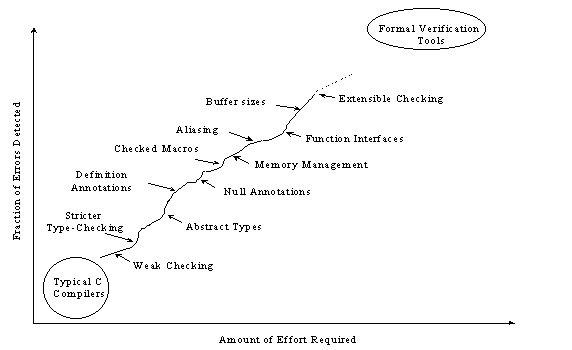
Figure 1. Typical Effort-Benefit Curve
Splint checking can be customized to select what classes of errors are reported using command line flags and stylized comments in the code. In addition, users can define new annotations and associated checks to extend Splint’s checking or to enforce application specific properties (Section 10).
About This Document
This document is a guide to using Splint. Section 1 explains how to run Splint, interpret messages and control checking. Sections 2–13 describe particular checks done by Splint. There are some minor dependencies between sections, but in general they can be read in any order. Section 14 covers issues involving libraries and header file inclusion important for running Splint on large systems.
This document does not describe technical details of the checking. For technical background and analysis of Splint’s effectiveness in practice, see the papers available at http://www.splint.org.
|
Since human beings themselves are not fully debugged yet, there will be bugs in your code no matter what you do. Chris Mason,Zero-defects memo (quoted in Microsoft Secrets, Cusumano and Selby) |
Splint is invoked by listing files to be checked. Initialization files, command line flags, and stylized comments may be used to customize checking globally and locally.
The best way to learn to use Splint, of course, is to actually use it (if you don’t already have Splint installed on your system, see Appendix A). Before you read much further in this document, I recommend finding a small C program. Then, try running:
splint *.c
For the most C programs, this will produce a large number of warnings. To turn off reporting for some of the warnings, try:
splint -weak *.c
The -weak flag is a mode flag that sets many checking parameters to select weaker checking than is done in the default mode. Other Splint flags will be introduced in the following sections; a complete list is given in Appendix B.
A typical warning message is:
sample.c: (in function faucet)
sample.c:11:12 : Fresh storage x not released before return
A memory leak has been detected. Storage allocated locally is not released
before the last reference to it is lost. (Use -mustfreefresh to inhibit
warning)
sample.c:5:47: Fresh storage x allocated
The first line gives the name of the function in which the error is found. This is printed before the first message reported for a function. The second line is the text of the message. This message reports a memory leak—storage allocated in a function is not deallocated before the function returns. The file name, line and column number where the error is located precedes the text.
The next line is a hint giving more information about the suspected error, including information on how the warning message may be suppressed. For this message, using the ‑mustfreefresh flag would prevent this warning from being reported. This flag can be set at the command line, or more precisely just around the code point in question by using annotations (see Section 1.3.2).
The final line of the message gives additional location information. For this message, it tells where the leaking storage was allocated.
The generic message format is (parts enclosed in square brackets are optional):
[<file>:<line> (in <context>)]
<file>:<line>[,<column>]: message
[hint]
<file>:<line>,<column>: extra location information, if appropriate
Users can customize the format and content of messages printed by Splint. The function context is not printed if -showfunc is used. Column numbers are not printed if ‑showcol is used. The +parenfileformat flag can be used to generate file locations in the format recognized by Microsoft Visual Studio. If +parenfileformat is set, the line number follows the file name in parentheses (e.g., sample.c(11).) Messages are split into lines of length less than the value set using -linelen <number>. The default line length is 80 characters. Splint attempts to split lines in a sensible place as near to the line length limit as possible.
The ‑hints prevents any hints from being printed. Normally, a hint is given only the first time a class of error is reported. To have Splint print a hint for every message regardless, use +forcehints.
So that many programming styles can be supported, Splint provides several hundred flags for controlling checking and message reporting. Some of the flags are introduced in the body of this document. Appendix B describes every flag. Modes and shortcut flags are provided for setting many flags at once. Individual flags can override the mode settings.
Flags are preceded by + or -. When a flag is preceded by + we say it is on; when it is preceded by - it is off. The precise meaning of on and off depends on the type of flag.
The +/- flag settings are used for consistency and clarity, but contradict standard UNIX usage and it is easy to accidentally use the wrong one. To reduce the likelihood of using the wrong flag, Splint issues warnings when a flag is set in an unusual way. Warnings are issued when a flag is redundantly set to the value it already had (these errors are not reported if the flag is set using a stylized comment), if a mode flag or special flag is set after a more specific flag that will be set by the general flag was already set, if value flags are given unreasonable values, of if flags are set in an inconsistent way. The -warnflags flag suppresses these warnings.
Default flag settings will be read from ~/.splintrc if it is readable. If there is a .splintrc file in the working directory, settings in this file will be read next and its settings will override those in ~/.splintrc. Command-line flags override settings in either file. The syntax of the .splintrc file is the same as that of command-line flags, except that flags may be on separate lines and the # character may be used to indicate that the remainder of the line is a comment. The -nof flag prevents the ~/.splintrc file from being loaded. The -f <filename> flag loads options from filename.
To make flag names more readable, hyphens (-), underscores (_) and spaces in flags at the command line are ignored. Hence, warnflags, warn-flags and warn_flags all select the warnflags option.
Stylized comments are used to provide extra information about a type, variable or function interface to improve checking, or to control flag settings locally.
All stylized comments begin with /*@ and are closed by the end of the comment. The role of the @ may be played by any printable character. Use -commentchar <char> to select a different stylized comment marker.
Annotations are stylized comments that follow a definite syntax. Although they are comments, they may only be used in fixed grammatical contexts (e.g., like a type qualifier).
Sections 2–6 describe annotations for expressing assumptions about variables, parameters, return values, structure fields and type definitions. For example, /*@null@*/ is used to express an assumption that a parameter may be NULL. Section 7 describes annotations for describing function interfaces. Other annotations are described in later sections and Section 10 describes mechanisms users can employ to define new annotations. A summary of annotations is found in Appendix C.
Some annotations, known as control comments, may appear between any two tokens in a C program (unlike regular C comments, control comments should not be used within a single token as they introduce new separators in the code). Syntactically, they are no different from standard comments. Control comments are used to provide source-level control of Splint checking. They may be used to suppress spurious messages, set flags, and control checking locally in other ways.
Most flags (all except those characterized as “global” in Appendix B) can be set locally using control comments. A control comment can set flags locally to override the command line settings. The original flag settings are restored before processing the next file. The syntax for setting flags in control comments is the same as that of the command line, except that flags may also be preceded by = to restore their setting to the original command-line value. For instance,
/*@+charint -modifies=showfunc@*/
sets charint on (this makes char and int indistinguishable types), sets modifies off (this prevents reporting of modification errors), and sets showfunc to its original setting (this controls whether or not the name of a function is displayed before a message).
A common cause of program failures is when a null pointer is dereferenced. Splint detects these errors by distinguishing possibly NULL pointers at interface boundaries.
The null annotation is used to indicate that a pointer value may be NULL. A pointer declared with no null annotation, may not be NULL. If null checking is turned on (controlled by null), Splint will report an error when a possibly null pointer is passed as a parameter, returned as a result, or assigned to an external reference with no null qualifier.
If a pointer is declared with the null annotation, the code must check that it is not NULL on all paths leading to a dereference of the pointer (or the pointer being returned or passed as a value with no null annotation). Dereferences of possibly null pointers may be protected by conditional statements or assertions (to see how assert is declared see Section 8.1) that check the pointer is not NULL.
Consider two implementations of firstChar in Figure 2. For firstChar1, Splint reports an error since the pointer that is dereferenced is declared with a null annotation. For firstChar2, no error is reported since the true branch of the s == NULL if statement returns, so the dereference of s is only reached if s is not NULL.
|
null.c |
Running Splint |
|
char firstChar1 (/*@null@*/ char *s) { }
char firstChar2 (/*@null@*/ char *s) { if
(s == NULL) return ‘\0’; } |
> splint null.c Splint 3.0.1
null.c: (in function firstChar1) null.c:3:11: Dereference of possibly null pointer s: *s null.c:1:35: Storage s may become null
Finished checking --- 1 code warning found
|
|
Figure 2. Null Checking Output from running Splint is displayed in sans-serif font. The command line is preceded by >, the rest is output from Splint. Explanations added to the code or splint output are shown in italics. Code shown in the figures in this document is available from the splint web site, http://www.splint.org . No error is reported for line 9, since the dereference is reached only if s is non-null. For most of the figures, the options -linelen 55 -hints –showcol were used to produce condensed output, and –exportlocal to inhibit warnings about exported declarations. |
Another way to protect null dereference, is to declare a function using nullwhentrue or falsewhennull(these annotations where originally falsenull and truenull, but were renamed to clarify the logical asymmetry; falsenull and truenull may still be used) and call the function in a conditional statement before the null-annotated pointer is dereferenced.
If a function annotated with nullwhentrue returns true it means its first passed parameter is NULL. If it returns false, the parameter is not NULL. Note that it may return true for a parameter that is not NULL. A more descriptive name for nullwhentrue would be “if the result is false, the parameter was not null”. For example, if isNull is declared as,
/*@nullwhentrue@*/ bool isNull (/*@null@*/ char *x);
we could write firstChar2:
char firstChar2 (/*@null@*/ char *s)
{
if (isNull (s)) return
'\0';
return *s;
}
No error is reported since the dereference of s is only reached if isNull(s) is false, and since isNull is declared with the nullwhentrue annotation this means s must not be null.
The falsewhennull annotation is not quite the logical opposite of nullwhentrue. If a function declared with falsewhennull returns true, it means its parameter is definitely not NULL. If it returns false, the parameter may or may not be NULL. That is a falsewhennull always returns false when passed a NULL parameter; it may sometimes return false when passed a non-NULL parameter.
For example, we could define isNonEmpty to return true if its parameter is not NULL and has least one character before the NUL terminator:
/*@falsewhennull@*/ bool isNonEmpty (/*@null@*/ char *x)
{
return (x != NULL && *x != ‘\0’);
}
Splint does not check that the implementation of a function declared with nullwhentrue or falsewhennull is consistent with its annotation, but assumes the annotation is correct when code that calls the function is checked.
The notnull annotation specifies that a declarator is definitely not NULL. By default, this is assumed, but it may be necessary to use notnull to override a null in a type definition. The null annotation may be used in a type definition to indicate that all instances of the type may be NULL. For declarations of a type declared using null, the null annotation in the type definition may be overridden with notnull. This is particularly useful for parameters to hidden static operations of abstract types (see Section 4.3) where the null test has already been done before the function is called, or function results known to never be NULL. For an abstract type, notnull may not be used for parameters to external functions, since clients should not be aware of when the concrete representation may by NULL. Parameters to static functions in the implementation module, however, may be declared using notnull, since they may only be called from places where the representation is accessible. Return values for static or external functions may be declared using notnull.
An additional annotation, relnull may be used to relax null checking. No error is reported when a relnull value is dereferenced, or when a possibly null value is assigned to an identifier declared using relnull.
This is generally used for structure fields that may or may not be null depending on some other constraint. Splint does not report and error when NULL is assigned to a relnull reference, or when a relnull reference is dereferenced. It is up to the programmer to ensure that this constraint is satisfied before the pointer is dereferenced.
Like many static checkers, Splint detects instances where the value of a location is used before it is defined. This analysis is done at the procedural level. If there is a path through the procedure that uses a local variable before it is defined, a use before definition error is reported. The usedef flag controls use before definition checking.
Splint can do more checking than standard checkers though, because the annotations can be used to describe what storage must be defined and what storage may be undefined at interface points. Unannotated references are expected to be completely defined at interface points. This means all storage reachable from a global variable, parameter to a function, or function return value is defined before and after a function call.
Sometimes, function parameters or return values are expected to reference undefined or partially defined storage. For example, a pointer parameter may be intended only as an address to store a result, or a memory allocator may return allocated but undefined storage. The out annotation denotes a pointer to storage that may be undefined.
Splint does not report an error when a pointer to allocated but undefined storage is passed as an out parameter. Within the body of a function, Splint will assume an out parameter is allocated but not necessarily bound to a value, so an error is reported if its value is used before it is defined.
Splint reports an error if storage reachable by the caller after the call is not defined when the function returns. This can be suppressed by -must-define. After a call returns, an actual parameter corresponding to an out parameter is assumed to be completely defined.
When checking unannotated programs, many spurious use before definition errors may be reported If impouts is on, no error is reported when an incompletely-defined parameter is passed to a formal parameter with no definition annotation, and the actual parameter is assumed to be defined after the call. The /*@in@*/ annotation can be used to denote a parameter that must be completely defined, even if impouts is on. If impouts is off, there is an implicit in annotation on every parameter with no definition annotation.
|
usedef.c |
Running Splint |
|
extern void setVal (/*@out@*/ int *x); extern int getVal (/*@in@*/ int *x); extern int mysteryVal (int *x);
int dumbfunc (/*@out@*/ int *x, int i) { if (i > 3) 11 return *x; else if (i > 1) 13 return getVal (x); else if (i == 0) 15 return mysteryVal (x); else { 18 setVal (x); 19 return *x; } } |
> splint usedef.c usedef.c:11: Value *x used before definition usedef.c:13: Passed storage x not completely defined (*x is undefined): getVal (x) usedef.c:15: Passed storage x not completely defined (*x is undefined): mysteryVal (x)
Finished checking --- 3 code warnings
No error is reported for line 18, since the incompletely defined storage x is passed as an out parameter. After the call, x may be dereferenced, since setVal is assumed to completely define its out parameter. The warning for line 15 would not appear if +impouts were used since there is no in annotation on the parameter to mysteryVal. |
The reldef annotation relaxes definition checking for a particular declaration. Storage declared with a reldef annotation is assumed to be defined when it is used, but no error is reported if it is not defined before it is returned or passed as a parameter.
It is up to the programmer to check reldef fields are used correctly. They should be avoided in most cases, but may be useful for fields of structures that may or may not be defined depending on other constraints.
The partial annotation can be used to relax checking of structure fields. A structure with undefined fields may be passed as a partial parameter or returned as a partial result. Inside a function body, no error is reported when the field of a partial structure is used. After a call, all fields of a structure that is passed as a partial parameter are assumed to be completely defined.
Strong type checking often reveals programming errors. Splint can check primitive C types more strictly and flexibly than typical compilers (4.1) and provides support a Boolean type (4.2). In addition, users can define abstract types that provide information hiding (0).
Two types have compatible type if their types are the same.
ANSI C, 3.1.2.6.
Splint supports stricter checking of built in C types. The char and enum types can be checked as distinct types, and the different numeric types can be type-checked strictly.
The primitive char type can be type-checked as a distinct type. If char is used as a distinct type, common errors involving assigning ints to chars are detected.
The +charint flag can be used for checking legacy programs where char and int are used interchangeably. If charint is on, char types indistinguishable from ints. To keep char and int as distinct types, but allow chars to be used to index arrays, use +charindex.
Standard C treats user-declared enum types just like integers. An arbitrary integral value may be assigned to an enum type, whether or not it was listed as an enumerator member. Splint checks each user-defined enum type as distinct type. An error is reported if a value that is not an enumerator member is assigned to the enum type, or if an enum type is used as an operand to an arithmetic operator. If the enumint flag is on, enum and int types may be used interchangeably. Like charindex, if the enumindex flag is on, enum types may be used to index arrays.
Splint reports where numeric types are used in dangerous or inconsistent ways. With the strictest checking, Splint will report an error anytime numeric types do not match exactly. If the relax-quals flag is on, only those inconsistencies that may corrupt values are reported. For example, if an int is assigned to a variable of type long (or passed as a long formal parameter), Splint will not report an error if relax-quals is on since a long must have at least enough bits to store an int without data loss. On the other hand, an error would be reported if the long were assigned to an int, since the int type may not have enough bits to store the long value.
Similarly, if a signed value is assigned to an unsigned, Splint will report an error since an unsigned type cannot represent all signed values correctly. If the +ignore-signs flag is on, checking is relaxed to ignore all sign qualifiers in type comparisons (this is not recommended, since it will suppress reporting of real bugs, but may be necessary for quickly checking certain legacy code).
Some types are declared to be integral types, but the concrete type may be implementation dependent. For example, the standard library declares the types size_t, ptr_diff and wchar_t, but does not constrain their types other than limiting them to integral types. Programs may rely on them being integral types (e.g., can use + operator on two size_t operands), but should not rely on a particular representation (e.g., long unsigned).
Splint supports three different kinds of arbitrary integral types:
/*@integraltype@*/
An arbitrary integral type. The actual type may be any one of short, int, long, unsigned short, unsigned, or unsigned long.
/*@unsignedintegraltype@*/
An arbitrary unsigned integral type. The actual type may be any one of unsigned short, unsigned, or unsigned long.
/*@signedintegraltype@*/
An arbitrary signed integral type. The actual type may be any one of short, int, or long.
Splint reports an error if the code depends on the actual representation of a type declared as an arbitrary integral. The match-any-integral flag relaxes checking and allows an arbitrary integral type is allowed to match any integral type.
Other flags set the arbitrary integral types to a concrete type. These should only be used if portability to platforms that may use different representations is not important. The long-integral and long-unsigned-integral flags set the type corresponding to /*@integraltype@*/ to be unsigned long and long respectively. The long-unsigned-unsigned-integral flag sets the type corresponding to /*@unsignedintegraltype@*/ to be unsigned long. The long-signed-integral flag sets the type corresponding to /*@signedintegraltype@*/ to be long.
Pre-ISO99 C had no Boolean representation – the result of a comparison operator was an integer, and no type checking is done for test expressions. C99 introduced a Boolean type (_Bool and bool, true and false macros in stdbool.h), but did not strengthen the type checking. Splint supports a Boolean type that can be checked distinctly from integral types. Many common errors can be detected by introducing a distinct Boolean type and stronger type checking.
Splint checks that the test expression in an if, while, or for statement or an operand of a &&, || or !operator is a Boolean. If the type of a test expression is not a Boolean, Splint will produce a warning depending on the type of the test expression and flag settings. If the test expression has pointer type, the warning is inhibited by –predboolptr (this can be used to prevent messages for the idiom of testing if a pointer is not null without a comparison). If it is type int, the warnings is inhibited by -pred-bool-int. For all other types, Splint warns unless -pred-bool-others is set. Relations, comparisons and certain standard library functions are declared to return Booleans.
Since using = instead of == is such a common bug, reporting of test expressions that are assignments is controlled by the separate pred-assign flag. The message can be suppressed by adding extra parentheses around the test expression.
Use the –booltype <name> flag to select the type name is used to represent Boolean values. There is no default Boolean type, although bool is used by convention. The names TRUE and FALSE are assumed to represent true and false Boolean values. To change the names of true and false, use -booltrue and -boolfalse. (The Splint distribution includes an implementation of bool, in lib/bool.h. However, it isn’t necessary to use this implementation to get the benefits of Boolean checking.)
Figure 4 illustrates some of the Boolean checking done by Splint.
|
bool.c |
Running Splint |
|
# include "bool.h" int f (int i, char *s, bool b1, bool b2) { 6 if (i = 3) 7 return b1; 8 if (!i || s) 9 return i; 10 if (s) 11 return 7; 12 if (b1 == b2) 13 return 3; 14 return 2; } |
> splint bool.c +predboolptr –booltype bool
bool.c:6: Test expression for if is assignment expression: i = 3 bool.c:6: Test expression for if not bool, type int: i = 3 bool.c:7: Return value type bool does not match declared type int: b1 bool.c:8: Operand of ! is non-boolean (int): !i bool.c:8: Right operand of || is non-boolean (char *): !i || s bool.c:10: Test expression for if not bool, type char *: s bool.c:12: Use of == with bool variables (risks inconsistency because of multiple true values): b1 == b2
Finished checking --- 7 code warnings found |
|
Figure 4. Boolean Checking |
Information hiding is a technique for handling complexity. By hiding implementation details, programs can be understood and developed in distinct modules and the effects of a change can be localized. One technique for information hiding is data abstraction. An abstract type is used to represent some natural program abstraction. It provides functions for manipulating instances of the type. The module that implements these functions is called the implementation module. We call the functions that are part of the implementation of an abstract type the operations of the type. Other modules that use the abstract type are called clients.
Clients may use the type name and operations, but should not manipulate or rely on the actual representation of the type. Only the implementation module may manipulate the representation of an abstract type. This hides information, since implementers and maintainers of client modules should not need to know anything about how the abstract type is implemented. It provides modularity, since the representation of an abstract type can be changed without having to change any client code.
Splint supports abstract types by detecting places where client code depends on the concrete representation of an abstract type. Some examples of abstraction violations detected by Splint are shown in Figure 5.
To declare an abstract type, the abstract annotation is added to a typedef. For example (in mstring.h),
typedef /*@abstract@*/ char *mstring;
declares mstring as an abstract type. It is implemented using a char *, but clients of the type should not depend on or need to be aware of this. If it later becomes apparent that a better representation such as a string table should be used, we should be able to change the implementation of mstring without having to change or inspect any client code.
In a client module, abstract types are checked by name, not structure. Splint reports an error if an instance of mstring is passed as a char * (for instance, as an argument to strlen), since the correctness of this call depends on the representation of the abstract type. Splint also reports errors if any C operator except assignment (=) or sizeof is used on an abstract type. The assignment operator is allowed since its semantics do not depend on the representation of the type (for abstract types whose instances can change value, a client does need to know if assignment has copy or sharing semantics as discussed in Section 4.3.2). The use of sizeof is also permitted, since this is the only way for clients to allocate pointers to the abstract type. Type casting objects to or from abstract types in a client module is an abstraction violation and will generate a warning message.
Normally, Splint will assume a type definition is not abstract unless the /*@abstract@*/ qualifier is used. If instead you want all user-defined types to be abstract types unless they are marked as concrete, the +imp-abstract flag can be used. This adds an implicit abstract annotation to any typedef that is not marked with /*@concrete@*/.
|
palindrome.c |
Running Splint |
|
# include "bool.h" # include "mstring.h"
bool isPalindrome (mstring s) { 6 char *current = (char *) s; 7 int i, len = (int) strlen (s);
for (i = 0; i <= (len+1) / 2; i++) { 11 if (current[i] != s[len-i-1]) return FALSE; } return TRUE; }
bool callPal (void) { 19 return (isPalindrome ("bob")); } |
> splint palindrome.c
palindrome.c:6: Cast from underlying abstract type mstring: (char *)s palindrome.c:7: Function strlen expects arg 1 to be char * gets mstring: s palindrome.c:11: Array fetch from non-array (mstring): s[len - i - 1] palindrome.c:19: Function isPalindrome expects arg 1 to be mstring gets char *: "bob"
Finished checking --- 4 code warnings
|
|
Figure 5. Information Hiding Violations |
Traditionally, programming books wax
mathematical when they arrive at the topic of abstract data
types…
Such books make it seem as if you’d never actually use an
abstract data type except as a sleep aid.
Steve McConnell
Where code may manipulate the representation of an abstract type, we say the code has access to that type. If code has access to an abstract type, the representation of the type and the abstract type are indistinguishable. Usually, a single program module that is the only code that has access to the type representation implements an abstract type. Sometimes, more complicated access control is desired if the implementation of an abstract type is split across program files, or particular client code needs to access the representation.
There are a several ways of selecting what code has access the representation of an abstract type:
· Modules. An abstract type defined in M .h is accessible in M.c. Controlled by the accessmodule flag. This means when accessmodule is on, as it is by default, the module access rule is in effect. If accessmodule is off (when -access-module is used), the module access rule is not in effect and an abstract type defined in M.h is not necessarily accessible in M .c.
· File names. An abstract type named type is accessible in files named type.<extension>. For example, the representation of mstring is accessible in mstring.h and mstring.c. Controlled by the access-file flag.
· Function names. An abstract type named type may be accessible in a function named type_name or typeName. For example, mstring_length and mstringLength would have access to the mstring abstract type. Controlled by accessfunction and the naming convention (see Section 12).
· Access control comments. The syntax /*@access type,+@*/[2] allows the following code to access the representation of type. Similarly, /*@noaccess type,+@*/ restricts access to the representation of type. The type in a noaccess comment must have been declared as an abstract type.
We can view types as being mutable or immutable. A type is mutable if passing it as a parameter to a function call can change the value of an instance of the type. For example, the primitive type int is immutable. If i is a local variable of type int and no variables point to the location where i is stored, the value of i must be the same before and after the call f (i). Structure and union types are also immutable, since they are copied when they are passed as arguments. On the other hand, pointer types are mutable. If x is a local variable of type int *, the value of *x (and hence, the value of the object x) can be changed by the function call g(x).
The mutability of a concrete type is determined by its type definition. For abstract types, mutability does not depend on the type representation but on what operations the type provides. If an abstract type has operations that may change the value of instances of the type, the type is mutable. If not, it is immutable. The value of an instance of an immutable type never changes. Since object sharing is noticeable only for mutable types, they are checked differently from immutable types.
The /*@mutable@*/ and /*@immutable@*/ annotations are used to declare an abstract type as mutable or immutable. (If neither is used, the abstract type is assumed to be mutable.) For example,
typedef /*@abstract@*/ /*@mutable@*/ char *mstring;
typedef /*@abstract@*/ /*@immutable@*/ int weekDay;
declares mstring as a mutable abstract type and weekDay as an immutable abstract type.
Clients of a mutable abstract type need to know the semantics of assignment. After the assignment expression s = t, do s and t refer to the same object (that is, will changes to the value of s also change the value of t).
Splint prescribes that all abstract types have sharing semantics, so s and t would indeed be the same object. Splint will produce a warning if a mutable type is implemented with a representation (e.g., a struct) that does not provide sharing semantics (controlled by mutrep flag).
The mutability of an abstract type is not necessarily the same as the mutability of its representation. We could use the immutable concrete type int to represent mutable strings using an index into a string table, or declare mstring as immutable as long as no operations are provided that modify the value of an mstring.
Sometimes it is useful to have a type that is abstract in some ways, but can be used with the standard numerical operators. Splint supports numabstract types for this purpose. The /*@numabstract@*/ annotation denotes a numabstract type. Splint will report warnings when numabstract types are used inconsistently, but allow binary numeric operators to operate on two values of the same numabstract type. Several flags control the strictness of type checking for numabstract types: numabstract, numabstractcast, numabstractlit, numabstractindex, and numabstractprint .
In C, all declarators must be declared to have exactly one type. This makes it impossible to write functions that operate on more than one type of parameter – for example, we cannot use the same square function for ints and floats. Because of the stricter type checking made possible by Splint, it is often useful to declare a parameter that has more than one possible type.
Splint provides alternate types to indicate that a declaration may be one of several possible types. The /*@alt type,+@*/ annotation creates a union type. For example, int /*@altchar, unsigned char@*/c declares c such that either an int, char or unsigned char value may be assigned to it without warning.
One use of alternate types is to specify the type of a macro that operates on multiple types of operands (see Section 11.2.1). Alternate types are also useful for declaring functions for which the return value may be safely ignored (see Section 8.4.2). A function can be declared to return t /*@altvoid@*/ to indicate that it returns a value of type t, but there should be not warning if that value is ignored.
About half the bugs in typical C programs can be attributed to memory management problems. Memory management bugs are notoriously difficult to detect through traditional techniques. Often, the symptom of the bug is far removed from its actual source. Memory management bugs often only appear sporadically and some bugs may only be apparent when compiler optimizations are turned on or the code is compiled on a different platform. Run-time tools offer some help, but are cumbersome to use and limited to detecting errors that occur when test cases are run. By detecting these errors statically, we can be confident that certain types of errors will never occur and provide verified documentation on the memory management behavior of a program.
Splint can detect many memory management errors at compile time including using storage that may have been deallocated (Section 5.2), memory leaks (Section 5.2), or returning a pointer to stack-allocated storage (Section 5.2.6).
Yea, from the
table of my memory I'll wipe away all trivial fond records, all
saws of books,
all forms, all pressures past, that youth and observation copied
there.
Hamlet prefers
garbage collection (Shakespeare, Hamlet. Act I, Scene
v)
Most of these checks depend on annotations added to programs to document assumptions related to memory management and pointer values. By documenting these assumptions for function interfaces, variables, type definitions and structure fields, memory management bugs can be detected at their source — where an assumption is violated. In addition, precise documentation about memory management decisions makes it easier to change code.
This section describes execution-time concepts for describing the state of storage more precisely than can be done using standard C terminology. Certain uses of storage are likely to indicate program bugs, and are reported as anomalies.[3]
Splint assumes a CLU-like object storage model.[4] An object is a typed region of storage. Some objects use a fixed amount of storage that is allocated and deallocated automatically by the compiler. Other objects use dynamic storage that must be managed by the program.
Storage is undefined if it has not been assigned a value, and defined after it has been assigned a value. An object is completely defined if all storage that may be reached from it is defined. What storage is reachable from an object depends on the type and value of the object. For example, if p is a pointer to a structure, p is completely defined if the value of p is NULL, or if every field of the structure p points to is completely defined.
When an expression is used as the left side of an assignment expression we say it is used as an lvalue. Its location in memory is used, but not its value. Undefined storage may be used as an lvalue since only its location is needed. When storage is used in any other way, such as on the right side of an assignment, as an operand to a primitive operator (including the indirection operator, *),[5] or as a function parameter, we say it is used as an rvalue. It is an anomaly to use undefined storage as an rvalue.
A pointer is a typed memory address. A pointer is either live or dead. A live pointer is either NULL or an address within allocated storage. A pointer that points to an object is an object pointer. A pointer that points inside an object (e.g., to the third element of an allocated block) is an offset pointer. A pointer that points to allocated storage that is not defined is an allocated pointer. The result of dereferencing an allocated pointer is undefined storage. Hence, it is an anomaly to use it as an rvalue. A dead (or “dangling”) pointer does not point to allocated storage. A pointer becomes dead if the storage it points to is deallocated (e.g., the pointer is passed to the free library function.) It is an anomaly to use a dead pointer as an rvalue.
There is a special object null corresponding to the NULLpointer in a C program. A pointer that may have the value NULL is a possibly-null pointer. It is an anomaly to use a possibly-null pointer where a non-null pointer is expected (e.g., certain function arguments or the indirection operator).
There are two kinds of deallocation errors with which we are concerned: deallocating storage when there are other live references to the same storage, or failing to deallocate storage before the last reference to it is lost. To handle these deallocation errors, we introduce a concept of an obligation to release storage. Every time storage is allocated, it creates an obligation to release the storage. This obligation is attached to the reference to which the storage is assigned.[6] Before the scope of the reference is exited or it is assigned to a new value, the storage to which it points must be released. Annotations can be used to indicate that this obligation is transferred through a return value, function parameter or assignment to an external reference.
‘Tis in my
memory lock’d, and you yourself shall keep the key of
it.
Ophelia prefers explicit
deallocation (Hamlet. Act I, Scene iii)
The only annotation is used to indicate a reference is the only pointer to the object it points to. We can view the reference as having an obligation to release this storage. This obligation is satisfied by transferring it to some other reference in one of three ways:
· pass it as an actual parameter corresponding to a formal parameter declared with an only annotation
· assign it to an external reference declared with an only annotation
· return it as a result declared with an only annotation
After the release obligation is transferred, the original reference is a dead pointer and the storage it points to may not be used.
All obligations to release storage stem from primitive allocation routines (e.g., malloc), and are ultimately satisfied by calls to free. The standard library declared the primitive allocation and deallocation routines.
The basic memory allocator, malloc, is declared:
/*@only@*/ /*@null@*/ void *malloc (size_t size);
It returns an object that is referenced only by the function return value.
The deallocator, free, is declared:[7]
void free (/*@only@*/ /*@out@*/ /*@null@*/ void *ptr);
|
Running Splint | |
|
1 extern /*@only@*/ int *glob;
/*@only@*/ int * f (/*@only@*/ int *x, int *y, int *z) /*@globals glob;@*/ { 8 int *m = (int *) 9 malloc (sizeof (int));
11 glob = y; Memory leak 12 free (x); 13 *m = *x; Use after free 14 return z; Memory leak detected } |
> splint only.c only.c:11: Only storage glob (type int *) not released before assignment: glob = y only.c:1: Storage glob becomes only only.c:11: Implicitly temp storage y assigned to only: glob = y only.c:13: Dereference of possibly null pointer m: *m only.c:8: Storage m may become null only.c:13: Variable x used after being released only.c:12: Storage x released only.c:14: Implicitly temp storage z returned as only: z only.c:14: Fresh storage m not released before return only.c:9: Fresh storage m allocated |
The parameter to free must reference an unshared object. Since the parameter is declared using only, the caller may not use the referenced object after the call, and may not pass in a reference to a shared object. There is nothing special about malloc and free — their behavior can be described entirely in terms of the provided annotations.
The temp annotation is used to declare a function parameter that is used temporarily by the function. An error is reported if the function releases the storage associated with a temp formal parameter or creates new aliases to it that are visible after the function returns. Any storage may be passed as a temp parameter, and it satisfies its original memory constraints after the function returns.
In real programs it is sometimes necessary to have storage that is shared between several possibly references. The owned and dependent annotations provide a more flexible way of managing storage, at the cost of less checking. The owned annotation denotes a reference with an obligation to release storage. Unlike only, however, other external references marked with dependent annotations may share this object. It is up to the programmer to ensure that the lifetime of a dependent reference is contained within the lifetime of the corresponding owned reference.
The keep annotation is similar to only, except the caller may use the reference after the call. The called function must assign the keep parameter to an only reference, or pass it as a keep parameter to another function. It is up to the programmer to make sure that the calling function does not use this reference after it is released. The keep annotation is useful for adding an object to a collection (e.g., a symbol table), where it is known that it will not be deallocated until the collection is.
If Splint is used to check a program designed to be used in a garbage-collected environment, there may be storage that is shared by one or more references and never explicitly released. The shared annotation declares storage that may be shared arbitrarily, but never released.
Local variables that are not allocated dynamically are stored on a call stack. When a function returns, its stack frame is deallocated, destroying the storage associated with the function’s local variables. A memory error occurs if a pointer into this storage is live after the function returns. Splint detects errors involving stack references exported from a function through return values or assignments to references reachable from global variables or actual parameters. No annotations are needed to detect stack reference errors, since it is clear from a declaration if storage is allocated on the function stack. Figure 7 gives and example of errors reported involving stack-allocated storage.
|
stack.c |
Running Splint |
|
int *glob;
/*@dependent@*/ int * f (int **x) { int sa[2] = { 0, 1 }; int loc = 3;
9 glob = &loc; 10 *x = &sa[0];
12 return &loc; } |
> splint stack.c stack.c:12: Stack-allocated storage &loc reachable from return value: &loc stack.c:12: Stack-allocated storage *x reachable from parameter x stack.c:10: Storage *x becomes stack stack.c:12: Stack-allocated storage glob reachable from global glob stack.c:9: Storage glob becomes stack
A dependent annotation is used on the return value. Without this, other warnings would be reported, since the result would have an implicit only annotation. |
|
Figure 7. Stack-Allocated Storage |
An annotation always applies to the outermost level of storage. For example,
/*@only@*/ int **x;
declares x as an unshared pointer to a pointer to an int. The only annotation applies to x, but not to *x. To apply annotations to inner storage a type definition may be used:
typedef /*@only@*/ int *oip;
/*@only@*/ oip *x;
Now, x is an only pointer to an oip, which is an only pointer to an int.
When annotations are used in type definitions, they may be overridden in instance declarations. For example,
/*@dependent@*/ oip x;
makes x a dependent pointer to an int. Another way to apply annotations to inner storage is to use a state clause (see Section 7.4).
Since it is important that Splint can check unannotated programs effectively, the meaning of declarations with no memory annotations is chosen to minimize the number of annotations needed to get useful checking on an unannotated program.
An implicit memory management annotation may be assumed for declarations with no explicit memory management annotation. Implicit annotations are checked identically to the corresponding explicit annotation, except error messages indicate that they result from an implicit annotation. Figure 8 illustrates some implicit annotations.
Unannotated function parameters are assumed to be temp. This means if memory checking is turned on for an unannotated program, all functions that release storage referenced by a parameter or assign a global variable to alias the storage will produce error messages. (Controlled by paramimptemp.)
|
implicit.c | |
|
typedef struct { only char *name; int val; } *rec;
extern only rec rec_last ;
extern only rec rec_create (temp char *name, int val) ; Annotations in italics are not present in the code, but may be implied depending on flag settings. |
Implicit only annotation on mutable structure field if structimponly is on.
Implicit only annotation on mutable global variables if globimponly is on.
Implicit only annotation on mutable function result if retimponly is set. Implicit temp annotation on mutable parameter if paramimptemp is set. |
|
Figure 8. Implicit Annotations |
Unannotated return values, structure fields and global variables are assumed to be only. With implicit annotations (on by default), turning on memory checking for an unannotated program will produce errors for any function that does not return unshared storage or assignment of shared storage to a global variable or structure field. If an exposure qualifier is used (see Section 6.2), the implied dependent annotation is used instead of the more generally implied only annotation. (Controlled by retimponly, structimponly and globimponly. The allimponly flag sets all of the implicit only flags.)
Another approach to memory management is to add a field to a type to explicitly keep track of the number of references to that storage. Every time a reference is added or lost the reference count is adjusted accordingly; if it would become zero, the storage is released. Reference counting it difficult to do without automatic checking since it is easy to forget to increment or decrement the reference count, and exceedingly difficult to track down these errors.
Splint supports reference counting by using annotations to constrain the use of reference counted storage in a manner similar to other memory management annotations.
A reference counted type is declared using the refcounted annotation. Only pointer to struct types may be declared as refcounted, since reference counted storage must have a field to count the references. One field in the structure (or integral type) is preceded by the refs annotation to indicate that the value of this field is the number of live references to the structure. For example (in rstring.h),
typedef /*@abstract@*/ /*@refcounted@*/ struct {
/*@refs@*/ int refs;
char *contents;
} *rstring;
declares rstring as an abstract, reference-counted type. The refs field counts the number of references and the contents field holds the contents of a string.
|
rstring.c |
Running Splint |
|
# include "rstring.h"
static rstring rstring_ref (rstring r) { r->refs++; 6 return r; }
rstring rstring_first (rstring r1, rstring r2) { if (strcmp (r1->contents, r2->contents) < 0) 12 return r1; else 14 return rstring_ref (r2); } |
> splint rstring.c rstring.c:12: Reference counted storage returned without modifying reference count: r1
No error is reported for line 6 since the reference count was incremented. No error is reported for line 14, since rstring_ref returns a new reference.
|
|
Figure 9. Reference Counting |
All functions that return refcounted storage must increase the reference count before returning. Splint cannot determine if the reference count was increased, so any function that directly returns a reference to refcounted storage will produce an error. This is avoided, by using a function to return a new reference (e.g., rstring_ref in Figure 9).
A reference counted type may be passed as a temp or dependent parameter. It may not be passed as an only parameter. Instead, the killref annotation is used to denote a parameter whose reference is eliminated by the function call. Like only parameters, an actual parameter corresponding to a killref formal parameter may not be used in the calling function after the call. Splint checks that the implementation of a function releases all killref parameters, either by passing them as killref parameters, or assigning or returning them without increasing the reference count.
Errors involving unexpected sharing of storage can cause serious problems. Undocumented sharing may lead to unpredictable modifications, and some library calls (e.g., strcpy) have undefined behavior if parameters share storage. Another class of sharing errors occurs when clients of an abstract type may obtain a reference to mutable storage that is part of the abstract representation. This exposes the representation of the abstract type, since clients may modify an instance of the abstract type indirectly through this shared storage.
Splint detects errors involving dangerous aliasing of parameters. Some of these errors are already detected through the standard memory annotations (e.g., only parameters may not be aliases.) Two additional annotations are provided for constraining aliasing of parameters and return values.
The unique annotation denotes a parameter that may not be aliased by any other storage reachable from the function implementation — that is, any storage reachable through the other parameters or global variables used by the function. The unique annotation places similar constraints on function parameters as the only annotation, but it does not transfer the obligation to release storage. Splint will report an error if a unique parameter may be aliased by another parameter or global variable.
Splint reports an error if a function returns a reference to storage reachable from one of its parameters (if retalias is on) since this may introduce unexpected aliases in the body of the calling function when the result is assigned.
Figure 10 illustrated sharing checks. An error is reported since the first parameter to the library function strcpy is declared with unique. If a unique qualifier were added to the parameter declaration for s or t, no error would be reported.
|
unique.c |
Running Splint |
|
# include <string.h>
void capitalize (/*@out@*/ char *s, char *t) { 7 strcpy (s, t); *s = toupper (*s); } |
> splint unique.c
unique.c: (in function capitalize) unique.c:7: Parameter 1 (s) to function strcpy is declared unique but may be aliased externally by parameter 2 (t)
|
|
Figure 10. Unique parameters |
The returned annotation denotes a parameter that may be aliased by the return value. Splint checks the call assuming the result may be an alias to the returned parameter.
Consider the following code excerpt:
extern intSet intSet_insert (/*@returned@*/ intSet s, int x);
intSet intSet_singleton (int x)
{
7 return (intSet_insert (intSet_new (), x));
}
Without the returned qualifier on the parameter to intSet_insert, a memory leak error would be reported for line 7, since the only storage returned by intSet_new is not released. Because of the returned qualifier, Splint assumes the result of intSet_insert is the same storage as its first parameter, in this case the storage returned by intSet_new. No error is reported, since the only storage is then transferred through the return value (which has an implicit only annotation, see Section 5.3).
Splint detects places where the representation of an abstract type is exposed. This occurs if a client has a pointer to storage that is part of the representation of an instance of the abstract type. The client can then modify or examine the storage this points to, and manipulate the value of the abstract type instance without using its operations.
There are three ways a representation may be exposed:
1. Returning (or assigning to a global variable) an object that includes a pointer to a mutable component of an abstract type representation. (Controlled by ret-expose).
2. Assigning a mutable component of an abstract object to storage reachable from an actual parameter or a global variable that may be used after the call. This means the client may manipulate the abstract object using the actual parameter after the call. Note that if the corresponding formal parameter is declared only, the caller may not use the actual parameter after the call so the representation is not exposed. (Controlled by assign-expose).
3. Casting mutable storage to or from an abstract type. (Controlled by cast-expose).
Annotations may be used to allow exposed storage to be returned safely by restricting how the caller may use the returned storage.
It is often useful for a function to return a pointer to internal storage (or an instance of a mutable abstract type) that is intended only as an observer. The caller may use the result, but should not modify the storage it points to. For example, consider a naïve implementation of the employee_getName operation for the abstract employee type:
typedef /*@abstract@*/ struct {
char *name;
int id;
} *employee;
…
char *employee_getName (employee e) { return e->name; }
Splint produces a message to indicate that the return value exposes the representation. One solution would be to return a fresh copy of e->name. This is expensive, though, especially if we expect employee_getName is used mainly just to get a string for searching or printing. Instead, we could change the declaration of employee_getName to:
extern /*@observer@*/ char *employee_getName (employee e);
Now, the original implementation is correct. The declaration indicates that the caller may not modify the result, so it is acceptable to return shared storage. (The program must also not use the returned observer storage after any other calls to the abstract type module using the same parameter. Splint does not attempt to check this, and in practice it is rarely a problem.) Splint checks that the caller does not modify the return value. An error is reported if observer storage is modified directly, passed as a function parameter that may be modified, assigned to a global variable or reference derivable from a global variable that is not declared with an observer annotation , or returned as a function result or a reference derivable from the function result that is not annotation with an observer annotation.
A program that attempts to modify a string literal has undefined behavior [ISO, 6.4.5]. This is not enforced by most C compilers, and can lead to particularly pernicious bugs that only appear when optimizations are turned on and the compiler attempts to minimize storage for string literals. Splint can be used to check that string literals are not modified, by treating them as -observer storage. If +read-only-strings is set (default in standard mode), Splint will report an error if a string literal is modified.
Sometimes it is necessary to expose the representation of an abstract type. This may be evidence of a design flaw, but in some cases is justified for efficiency reasons. The exposed annotation denotes storage that is exposed. It may be used on a return value for results that reference storage internal to an abstract representation, on a parameter value to indicate a parameter that may be assigned directly to part of an abstract representation (note that if the parameter is annotated with only, it is not an error to assign it to part of an abstract representation, since the caller may not use the storage after the call returns), or on a field of an abstract representation to indicate that external references to the storage may exist. An error is reported if exposed storage is released, but unlike an observer, no error is reported if it is modified. Figure 11 shows examples of exposure problems detected by Splint.
|
exposure.c |
Running Splint |
|
# include "employee.h"
char * employee_getName (employee e) { 6 return e->name; }
/*@observer@*/ char * employee_obsName (employee e) { return e->name; }
/*@exposed@*/ char * employee_exposeName (employee e) { return e->name; }
void employee_capName (employee e) { char *name;
name = employee_obsName (e); 23 *name = toupper (*name); } |
> splint exposure.c +checks
exposure.c:6: Function returns reference to parameter e: e->name exposure.c:6: Return value exposes rep of employee: e->name exposure.c:6: Released storage e->name reachable from parameter at return point exposure.c:6: Storage e->name is released exposure.c:23: Suspect modification of observer name: *name = toupper(*name)
Three messages are reported for line 6 where a mutable field of an abstract type is returned with no sharing qualifier (without +checksonly the third one would be reported.) The error for line 23 reports a modification of an observer. If the call in line 22 were changed to call employee_exposeName , no error would be reported. |
Functions communicate with their calling environment through an interface. The caller communicates the values of actual parameters and global variables to the function, and the function communicates to the caller through the return value, global variables and storage reachable from the actual parameters. By keeping interfaces narrow (restricting the amount of information visible across a function interface), we can understand and implement functions independently.
A function prototype documents the interface to a function. It serves as a contract between the function and its caller. In early versions of C, the function “prototype” was very limited. It described the type returned by the function but nothing about its parameters. ANSI C (1989) provided function prototypes with the ability to add information on the number and types of parameter to a function. Splint provides the means to express much more about a function interface such as what global variable the function may use and what values visible to the caller it may modify.
The extra interface information places constraints on both how the function may be called and how it may be implemented. Splint reports places where these constraints are not satisfied. Typically, these indicate bugs in the code or errors in the interface documentation.
This section describes annotations that may be added to a function declaration to document what global variables the function implementation may use and what values visible to its caller it may modify.
The modifies clause lists what values visible to the caller may be modified by a function. Modifies clauses limit what values a function may modify, but they do not require that listed values are always modified. The declaration,
int f (int *p, int *q) /*@modifies *p@*/;
declares a function f that may modify the value pointed to by its first argument but may not modify the value of its second argument or any global state.
Splint checks that a function does not modify any caller-visible value not encompassed by its modifies clause and does modify all values listed in its modifies clause on some possible execution of the function. Figure 12 shows an example of modifies checking done by Splint.
|
Running Splint | |
|
void setx (int *x, int *y) /*@modifies *x@*/ { 4 *y = *x; }
void sety (int *x, int *y) /*@modifies *y@*/ { setx (y, x); } |
> splint modify.c +checks modify.c:4: Undocumented modification of *y: *y = *x modify.c:5: Suspect object listed in modifies of setx not modified: *x modify.c:1: Declaration of setx
There are
no errors
for sety– the call to
setxmodifies the value |
|
Figure 12. Modification |
A few special names are provided for describing function modifications that effect state not identifiable through parameters or global variables:
internalState
The function modifies some internal state (that is, the value of a static variable). Even though a client cannot access the internal state directly, it is important to know that something may be modified by the function call both for clear documentation and for checking undefined order of evaluation (Section 8.2) and side effect free parameters (Section 11.2.1).
fileSystem
The function modifies the file system. Any modification that may change the system state is considered a file system modification. All functions that modify an object of type pointer to FILE also modify the file system. In addition, functions that do not modify a FILE pointer but modify some state that is visible outside this process also modify the file system (e.g., rename). The flag mod-file-system controls reporting of undocumented file system modifications.
nothing
The function modifies nothing (i.e., it is side effect free).
The annotation, /*@*/ in a function declaration or definition (after the parameter list, before the semi-colon or function body) denotes a function that modifies nothing and does not use any global variables (see Section 7.2).
Splint is designed so programs with many functions that are declared without modifies clauses can be checked effectively. Unless modnomods is in on, no modification errors are reported checking a function declared with no modifies clause.
A function with no modifies clause is an unconstrained function since there are no documented constraints on what it may modify. When an unconstrained function is called, it is checked differently from a function declared with a modifies clause. To prevent spurious errors, no modification error is reported at the call site unless the mod-uncon flag is on. Flags control whether errors involving unconstrained functions are reported for other checks that depend on modifications (side effect free macro parameters (Section 11.2.1), undefined evaluation order (Section 8.2), and likely infinite loops (Section 8.3.1).)
Another aspect of a function’s interface, is the global variables it uses. A globals list in a function declaration lists external variables that may be used in the function body. Splint checks that global variables used in a procedure match those listed in its globals list. A global is used in a function if it appears in the body directly, or it is in the globals list of a function called in the body. Splint reports if a global that is used in a procedure is not listed in its globals list, and if a listed global is not used in the function implementation. Figure 13 shows an example function definition with a globals list and associated checking done by Splint.
|
globals.c |
Running Splint |
|
int glob1, glob2;
3 int f (void) /*@globals glob1;@*/ { 5 return glob2; } |
> splint globals.c +checks
globals.c:5: Undocumented use of global glob2 globals.c:3: Global glob1 listed but not used
|
|
Figure 13. Global Variables |
Whether on not an error is reported for a use of a global variable in a given function depends on the scope of the variable (file static or external), the checking annotation used in the variable declaration or the implicit annotation if no checking annotation is used, whether or not the function is declared with a globals list, and flag settings.
A global or file static variable declaration may be preceded by an annotation to indicate how the variable should be checked. In order of decreasing checks, the annotations are:
/*@checkedstrict@*/
Strictest checking. Undocumented uses and modifications of the variable are reported in all functions whether or not they have a globals list (unless check-strict-globs is off).
/*@checked@*/
Undocumented use of the variable is reported in a function with a globals list, but not in a function declared with no globals (unless glob-noglobs is on).
/*@checkmod@*/
Undocumented uses of the variable are not reported, but undocumented modifications are reported. (If mod-globs-nomods is on, errors are reported even in functions declared with no modifies clause or globals list.)
/*@unchecked@*/
No messages are reported for undocumented use or modification of this global variable.
If a variable has none of these annotations, an implicit annotation is determined by the flag settings.
Different flags control the implicit annotation for variables declared with global scope and variables declared with file scope (i.e., using the static storage qualifier). To set the implicit annotation for global variables declared in context (globs for external variables or statics for file static variable) to be annotation (checked, checkmod, checkedstrict) use imp<annotation> <context>. For example, +imp-checked-strict-statics makes the implicit checking on unqualified file static variables checkedstrict. See Appendix B for a complete list of globals checking flags.
Annotations can be used in the globals list of a function declaration to describe the states of global variables before and after the call. If a global is preceded by undef, it is assumed to be undefined before the call. Thus, no error is reported if the global is not defined when the function is called, but an error is reported if the global is used in the function body before it is defined. The killed annotation denotes a global variable that may be undefined when the call returns. For globals that contain dynamically allocated storage, a killed global variable is similar to an only parameter (Section 5.2). An error is reported if it contains the only reference to storage that is not released before the call returns. Figure 14 illustrated killed and undef globals.
|
annotglobs.c |
Running Splint |
|
int globnum;
struct { char *firstname, *lastname; int id; } globname;
void initialize (/*@only@*/ char *name) /*@globals undef globnum, undef globname @*/ { 13 globname.id = globnum; globname.lastname = name; 15}
void finalize (void) /*@globals killed globname@*/ { free (globname.lastname); 21 } |
> splint annotglobs.c
annotglobs.c:13: Undef global globnum used before definition annotglobs.c:15: Global storage globname contains 1 undefined field when call returns: firstname annotglobs.c:21: Only storage globname.firstname (type char *) derived from killed global is not released (memory leak) |
|
Figure 14. Annotated Globals Lists |
Splint checks that function declarations and definitions are consistent. The general rule is that the first declaration of a function implies all later declarations and definitions. If a function is declared in a header file, the first declaration processed is its first declaration (if it is declared in more than one header file an error is reported if redecl is set) . Otherwise, the first declaration in the file defining the function is its first declaration.
Later declarations may not include variables in the globals list that were not included in the first declaration. The exception to this is when the first declaration is in a header file and the later declaration or definition includes file static variables. Since these are not visible in the header file, they can not be included in the header file declaration. Similarly, the modifies clause of a later declaration may not include objects that are not modifiable in the first declaration. The later declaration may be more specific. For example, if the header declaration is:
extern void setName (employee e, char *s) /*@modifies e@*/;
the later declaration could be,
void setName (employee e, char *) /*@modifies e->name@*/;
If employee is an abstract type, the declaration in the header should not refer to a particular implementation (i.e., it shouldn’t rely on there being a name field), but the implementation declaration can be more specific.
This rule also applies to file static variables. The header declaration for a function that modifies a file static variable should use modifies internalState since file static variables are not visible to clients. The implementation declaration should list the actual file static variables that may be modified.
Sometimes it is necessary to specify function interfaces at a lower level than is possible with the standard annotations. For example, if a function defines some fields of a returned structure but does not define all the fields. The /*@special@*/ annotation is used to mark a parameter, global variable, or return value that is described using state clauses.
State clauses may be used to constrain the state of a parameter or return value before or after a call. One or more state clauses may appear in a function declaration, before the modifies or globals clauses. State clauses may be listed in any order, but the same state clause should not be used more than once. In a state clause list, result is used to refer to the return value of the function.
The following state clauses are used to describe the definition state or parameters before and after the function is called and the return value after the function returns:
/*@uses <references>@*/
References in a uses clause must be completely defined before the function is called. They are assumed to be defined at function entrance when the function is checked.
/*@sets <references>@*/
References in a sets clause must be allocated before the function is called. They are completely defined after the function returns. They are assumed to be allocated but undefined storage at function entrance and an error is reported if there is a path on which they are not defined before the function returns.
/*@defines <references>@*/
References in a defines clause must not refer to unshared, allocated storage before the function is called. They are completely defined after the function returns. When the function is checked, they are assumed to be undefined at function entrance and an error is reported if there is a path on which they are not defined before the function returns.
/*@allocates <references>@*/
References in an allocates clause must be unallocated before the function is called. They are allocated but not necessarily defined after the function returns. An error is reported if there is a path through the function on which they are not allocated before the function returns.
/*@releases <references>@*/
References in the releases clause are deallocated by the function. They must be storage that could be passed as an only parameter before the function is called, and are dead pointers after the function returns. They are assumed to be defined at function entrance and an error is reported if they refer to live, allocated storage at any return point.
Some examples of state clauses are shown in Figure 15. The defines clause for record_new indicates that the id field of the structure pointed to by the result is defined, but the name field is not. So, record_create needs to call record_setName to define the name field. Similarly, the releases clause for record_clearName indicates that no storage is associated with the name field of its parameter after the return, so no failure to deallocate storage message is produced for the call to free in record_free. The ensures isnull clause is described in the next section.
|
clauses.c |
|
typedef struct { int id; /*@only@*/ char *name; } *record;
static /*@special@*/ record record_new (void) /*@defines result->id@*/ { record r = (record) malloc (sizeof (*r));
assert (r != NULL); r->id = 3; return r; }
static void record_setName (/*@special@*/ record r, /*@only@*/ char *name) /*@defines r->name@*/ { r->name = name; }
record record_create (/*@only@*/ char *name) { record r = record_new (); record_setName (r, name); return r; }
void record_clearName (/*@special@*/ record r) /*@releases r->name@*/ /*@ensures isnull r->name@*/ { free (r->name); r->name = NULL; }
void record_free (/*@only@*/ record r) { record_clearName (r); free (r); }
|
|
Figure 15. State Clauses |
More general assumptions about state of parameters and globals before and after a function is called can be described using requires and ensures clauses. A requires clause specifies a predicate that must be true at a call site; when checking a function implementation Splint assumes the constraints given in its requires clauses are true at function entry. An ensures clause specifies a predicate that is true at a call site after the call returns; when checking a function implementation Splint warns if there is an execution path that does not return with a state that satifies the constraints given in its ensures clauses. A function declaration can have many requires and ensures clauses as long as their meanings are not contradictory.
The following constraints can be stated using requires and ensures clauses:
/*@requires only<references>@*/; /*@ensures only<references>@*/
/*@requires shared<references>@*/; /*@ensures shared<references>@*/
/*@requires owned<references>@*/; /*@ensures owned<references>@*/
/*@requires dependent<references>@*/; /*@ensures dependent<references>@*/
References refer to only, shared, owned or dependent storage before (requires) or after (ensures) the call.
/*@requires observer<references>@*/; /*@ensures observer<references>@*/
/*@requires exposed<references>@*/; /*@ensures exposed <references>@*/
References refer to observer or exposed storage before (requires) or after (ensures) the call.
/*@requires isnull<references>@*/; /*@ensures isnull<references>@*/
References have the value NULL before (requires) or after (ensures) the call. Note, this is not the same name or meaning as the null annotation (which means the value may or may not be NULL.)
/*@requires notnull<references>@*/; /*@ensures notnull<references>@*/
References do not have the value NULL before (requires) or after (ensures) the call.
The section describes checking done by Splint related to control flow. Many of these checks are significantly improved because of the extra information that is known about the program when annotations are provided.
To detect certain errors and avoid spurious errors, it is important to know something about the control flow behavior of called functions. Without additional information, Splint assumes that all functions eventually return and execution continues normally at the call site.
The noreturn annotation is used to denote a function that never returns [8]. For example,
extern /*@noreturn@*/ void fatalerror (/*@observer@*/ char *s);
declares fatalerror to never return. This enables Splint to correctly analyze code like,
if (x == NULL) fatalerror ("Yikes!");
*x = 3;
Other functions may return, but sometimes (or usually) return normally. The maynotreturn annotation denotes a function that may or may not return. This may be useful for documentation, but does not help checking much, since Splint must assume that a function declared with maynotreturn returns normally when checking the code. The alwaysreturns annotation denotes a function that always returns (but Splint does no checking to verify this).
To describe non-returning functions more precisely, the noreturnwhentrue and noreturnwhenfalse annotations may be used. Similar to nullwhentrue and falsewhennull (see Section 2.1.1), noreturnwhentrue and noreturnwhenfalse mean that a function never returns if the value of its first argument is true (noreturnwhentrue) or false (noreturnwhenfalse). They may be used only on functions whose first argument is a Boolean.
Hence, a function declared with noreturnwhenwfalse must not return if the value of its argument is false. For example, the standard library declares assert as[9]:
/*@noreturnwhenfalse@*/ void
assert (/*@sef@*/ bool /*@alt int@*/ pred);
This way, code like,
assert (x != NULL);
*x = 3;
is checked without reporting a false warning, since the noreturnwhenwfalse annotation on assert means the deference of x is not reached is x != NULL is false.
The order in which side effects take place in a C program is not entirely defined by the code. Certain execution points are known as sequence points — a function call (after the arguments have been evaluated), the end of a full expression (an initializer, expression in an expression statement, the control expression of an if, switch, while or do statement, each expression of a for statement, and the expression in a return statement), and after the first operand or a &&, ||, ? or , operand.
All side effects before a sequence point must be complete before the sequence point, and no evaluations after the sequence point shall have taken place. Between sequence points, side effects and evaluations may take place in any order. Hence, the order in which expressions or arguments are evaluated is not specified. Compilers are free to evaluate function arguments and parts of expressions (that do not contain sequence points) in any order. The behavior of code is undefined if it uses a value that is modified by another expression that is not required to be evaluated before or after the other use.
Splint detects instances where undetermined order of evaluation produces undefined behavior. If modifies clauses and globals lists are used, this checking is enabled in expressions involving function calls. Evaluation order checking is controlled by the eval-order flag.
|
order.c |
Running Splint |
|
extern int glob;
extern int mystery (void);
extern int modglob (void) /*@globals glob@*/ /*@modifies glob@*/;
int f (int x, int y[]) { 11 int i = x++ * x;
13 y[i] = i++; 14 i += modglob() * glob; 15 i += mystery() * glob; 16 return i; } |
> splint order.c +evalorderuncon order.c:11: Expression has undefined behavior (value of right operand modified by left operand): x++ * x order.c:13: Expression has undefined behavior (left operand uses i, modified by right operand): y[i] = i++ order.c:14: Expression has undefined behavior (value of right operand modified by left operand): modglob() * glob order.c:15: Expression has undefined behavior (unconstrained function mystery used in left operand may set global variable glob used in right operand): mystery() * glob
The warning for line 14 is reported because the modifies clause of modglob indicated that it may modify glob. The behavior is undefined since we don’t know if glob is evaluated before, after or during the modification. The line 15 warning would not be reported without +evalorderuncon. |
|
Figure 16. Evaluation Order |
When checking systems without modifies and globals information (see Section 7), evaluation order checking may report errors when unconstrained functions are called in procedure arguments. Since Splint has no annotations to constrain what these functions may modify, it cannot be guaranteed that the evaluation order is defined if another argument calls an unconstrained function or uses a global variable or storage reachable from a parameter to the unconstrained function. Its best to add modifies and globals clauses to constrain the unconstrained functions in ways that eliminate the possibility of undefined behavior. For large legacy systems, this may require too much effort. Instead, the ‑eval-order-uncon flag may be used to prevent reporting of undefined behavior due to the order of evaluation of unconstrained functions. Figure 16 illustrates detection of undefined behavior.
|
loop.c |
Running Splint |
|
extern int glob1, glob2; extern int f (void) /*@globals glob1@*/ /*@modifies nothing@*/; extern void g (void) /*@modifies glob2@*/ ; extern void h (void) ;
void upto (int x) { 14 while (x > f ()) g(); 15 while (f () < 3) h(); } |
> splint loop.c +infloopsuncon loop.c:14: Suspected infinite loop. No value used in loop test (x, glob1) is modified by test or loop body. loop.c:15: Suspected infinite loop. No condition values modified. Modification possible through unconstrained calls: h An error
is reported for line 14 since the only value modified by |
|
Figure 17. Infinite Loops |
A number of control structures that are syntactically legal may indicate likely bugs in programs. Splint can detect errors involving likely infinite loops (Section 8.3.1), fall through cases and missing cases in switch statements (Section 8.3.2), break statements within deeply nested loops or switches (Section 8.3.3), clauses of if, while or for statements that are empty statements or unblocked single statements (Section 8.3.4) and incomplete if-else logic (Section 8.3.5). Although any of these may appear in a correct program, depending on the programming style used they may indicate likely bugs or style violations that should be detected and eliminated.
Splint reports an error if it detects a loop that appears to be infinite. An error is reported for a loop that does not modify any value used in its condition test inside the body of the loop or in the condition test itself. This checking is enhanced by modifies clauses and globals lists (see Section 7) since they provide more information about what global variable may be used in the condition test and what values may be modified by function calls in the loop body.
Figure 17 shows examples of infinite loops detected by Splint. An error is reported for the loop in line 14, since neither of the values used in the loop condition (x directly and glob1 through the call to f) is modified by the body of the loop. If the declaration of g is changed to include glob1 in the modifies clause no error is reported. (In this example, if we assume the annotations are correct, then the programmer has probably called the wrong function in the loop body. This isn’t surprising, given the horrible choices of function and variable names!)
If an unconstrained function is called within the loop body, Splint will assume that it modifies a value used in the condition test and not report an infinite loop error, unless infloopsuncon is on. If infloopsuncon is on, Splint will report infinite loop errors for loops where there is no explicit modification of a value used in the condition test, but where they may be an undetected modification through a call to an unconstrained function (e.g., line 12 in Figure 17).
The automatic fall through of C switch statements is almost never the intended behavior.[10] Splint detects case statements with code that may fall through to the next case. The casebreak flag controls reporting of fall through cases. A single fall through case may be marked by preceding the case keyword with /*@fallthrough@*/ to indicate explicitly that execution falls through to this case. See Figure 18 for an example.
For switches on enum types, Splint reports an error if a member of the enumerator does not appear as a case in the switch body (and there is no default case). (Controlled by misscase.)
|
switch.c |
Running Splint |
|
typedef enum { YES, NO, DEFINITELY, PROBABLY, MAYBE } ynm; void decide (ynm y) { switch (y) { case PROBABLY: case NO: printf ("No!"); 10 case MAYBE: printf ("Maybe"); /*@fallthrough@*/ case YES: printf ("Yes!"); 13 } } |
> splint switch.c switch.c:10: Fall through case (no preceding break) switch.c:13: Missing case in switch: DEFINITELY
No fall through error is
reported for the NO
case, The
/*@fallthrough@*/ comment
prevents |
|
Figure 18. Switch Cases |
There is no syntax provided by C (other than goto) for breaking out of a nested loop. All break and continue statements act only on the innermost surrounding loop or switch. This can lead to serious problems[11] when a programmer intends to break the outer loop or switch instead. Splint optionally reports warnings for break and continue statements in nested contexts.
Four types of break warnings are reported:
· break inside a loop (while or for) that is inside a loop. Controlled by looploopbreak. To indicate that a break is inside an inner loop, precede the break by /*@innerbreak@*/.
· break inside a loop that is inside a switch statement. Controlled by switchloopbreak. To mark the break as a loop break, precede the break by /*@loopbreak@*/.
· break inside a switch statement that is inside a loop. Controlled by loopswitchbreak. To mark the break as a switch break, precede the break by /*@switchbreak@*/.
· break inside a switch inside another switch. Controlled by switchswitchbreak. To indicate that the break is for the inner switch, use /*@innerbreak@*/.
Since continue only makes sense within loops, a warning (Controlled by looploopcontinue.) is reported only for continue statements within nested loops. A safe inner continue may be preceded by /*@innercontinue@*/ to suppress error messages locally. The deepbreak flag sets all nested break and continue checking flags.
Splint warns if the marker preceding a break is not consistent with its placement. A warning results if innerbreak precedes a break that is not breaking an inner loop, switchbreak precedes a break that is not breaking a switch, or loopbreak precedes a break that is not breaking a loop.
An empty statement after an if, while or for often indicates a potential bug. A single statement (i.e., not a compound block) after an if, while or for is not likely to indicate a bug, but make the code harder to read and edit. Splint can report errors for if or loop statements with empty bodies or bodies that are not compound statements. Separate flags control checking for statements following an if, while or for:
· [if,while, for]empty — report errors for empty bodies (e.g., if (x > 3) ; )
· [if,while, for]block — report errors for non-block bodies (e.g., if (x > 3) x++;)
The if statement checks also apply to the body of the else clause. No ifblock warning is reported if the body of the else clause is an if statement, to allow conventional else if chains.
Although it may be perfectly reasonable in many contexts, an if-else chain with no final else may indicate missing logic or forgetting to check error cases. If elseif-complete is on, Splint warns when an if statement that is the body of an else clause does not have a matching else clause. For example, the code,
if (x == 0) { return "nil"; }
else if (x == 1) { return "many"; }
results in a warning since the second if has no matching else branch.
Splint detects errors involving statements with no apparent effects (Section 8.4.1) and statements that ignore the result of a called function (Section 8.4.2).
Splint can report errors for statements that have no effect. (Controlled by no-effect.) Because of modifies clauses, Splint can detect more errors than traditional checkers. Unless the no-effect-uncon flag is on, errors are not reported for statements that involve calls to unconstrained functions since the unconstrained function may cause a modification. Figure 19 shows examples of Splint’s no effect checking.
|
Running Splint | |
|
extern void nomodcall (int *x) /*@*/; Recall /*@*/ is shorthand for extern void mysterycall (int *x);
int noeffect (int *x, int y) { y == *x; nomodcall (x); mysterycall (x); return *x; } |
> splint noeffect.c +noeffectuncon noeffect.c:6: Statement has no effect: y == *x noeffect.c:7: Statement has no effect: nomodcall(x) noeffect.c:8: Statement has no effect (possible undetected modification through call to unconstrained function mysterycall): mysterycall(x)
The warning
for line 8 would not be |
|
Figure 19. Statements with No Effect |
Splint reports an error when a return value is ignored. Checking may be controlled based on the type of the return value: ret-val-int controls reporting of ignored return values of type int, and ret-val-bool for return values of type bool, and ret-val-others for all other types. A function statement may be cast to void to prevent this error from being reported.
Alternate types (Section 4.4) can be used to declare functions that return values that may safely be ignored by declaring the result type to alternately be void. Several functions in the standard library are specified to alternately return void to prevent ignored return value errors for standard library functions (e.g., strcpy) where the result may be safely ignored (see Section 14.1). Figure 20 shows examples of ignored return value errors reported by Splint.
|
ignore.c |
Running Splint |
|
# include “bool.h” extern int fi (void); extern bool fb (void); extern int /*@alt void@*/ fv (void);
int ignore (void) { 8 fi (); 9 (void) fi (); 10 fb (); 11 fv (); 12 return fv (); } |
> splint ignore.c
ignore.c:8: Return value (type int) ignored: fi() ignore.c:10: Return value (type bool) ignored: fb()
The message for line 8 would not be reported
if ‑retvalint
is set;
No message is reported for line 9 because
the result is cast to void
,
|
|
Figure 20. Ignored Return Values |
Buffer overflow errors are a particularly dangerous type of bug in C programs. They are directly responsible for about half of all security attacks [Larochelle01]. For performance reasons, C does not perform run time bounds checking. Referencing storage outside allocated regions can cause memory corruption and lead to strange behavior. Moreover, buffer overflow bugs are particularly insidious because they can go undetected in testing or normal use, but usually result in security critical bugs. Reads beyond the end of a buffer can cause the program to leak information. Writes beyond the end a buffer (buffer overflows) can usually be exploited make the program run arbitrary code. Attackers can exploit these programming bugs to replace the return address on the stack and place arbitrary code in memory thereby gaining full access to the machine. Splint is able to detect many memory bounds errors. [12]
Splint models blocks of contiguous memory using two properties: maxSet and maxRead. Given a buffer b, maxSet(b) denotes the highest address beyond b that can be safely used as an lvalue. For the declaration char buf[MAXSIZE] we have maxSet(buf) = MAXSIZE - 1. Similarly, maxRead denotes the highest index of a buffer that can be safely used an rvalue. It is inappropriate to read an uninitialized element or beyond the NUL terminator of a null terminated buffer.
When a buffer is accessed as an lvalue, Splint generates a precondition constraint involving the maxSet property. When a buffer is accessed as an rvalue, Splint generates a precondition constraint involving the maxRead property. For the expression *ptr, Splint generates the constraints maxSet(ptr) >= 0 or maxRead(ptr) >= 0 depending on whether ptr is used as an lvalue or rvalue. Similarly, for accesses of the form ptr[i], splint generates the constraints maxSet(ptr) >= i or maxRead(ptr) >= i. If +boundswrite is set, Splint warns if it is unable to resolve a constraint involving maxSet. If +boundsread is set, Splint warns about unresolved maxRead constraints also.
Splint generates postconditions for statements to help resolve precondition constraints. When a buffer is written to we know that an element of a buffer is initialized and is safe to read. We generate the postcondition maxRead(ptr) >= 0 if the buffer is accessed using *ptr or maxRead(ptr) >= i if the buffer is accessed using ptr[i]. Splint generates additional postconditions for a variety of C constructs. For assignment statements, Splint generates a postcondition equating the two operands. Splint also generates post condition constraints for the maxSet value of fixed sized arrays.
Function declarations may include requires and ensures clauses that specify assumptions about buffer sizes for function preconditions. They are interpreted like requires and ensures clauses for simple memory states (see Section 7.5) but can be more expressive. When a function with a requires clause is called, the call site must be checked to satisfy the constraints implied by the requires clause. Similarly, an ensures clause can be used to specify function post conditions. If the +checkpost flag is set, Splint warns if it cannot verify that a function implementation satisfies its declared postconditions.
Constraints can contain function parameters as well as global variables and integer constants. The unary operators, maxSet and maxRead which correspond to the properties described above are also supported. Multiple predicates may be conjoined using /\.
For example, the standard library annotates strcpy:
void /*@alt char * @*/strcpy
(/*@unique@*/ /*@out@*/ /*@returned@*/ char *s1, char *s2)
/*@modifies *s1@*/
/*@requires maxSet(s1) >= maxRead(s2) @*/
/*@ensures maxRead(s1) == maxRead (s2) @*/;
The requires clause indicates that the buffer passed as s1 must be large enough to hold the string passed as s2. The ensures clause specifies that maxRead of s1 after the call is equal to maxRead of s2. In cases where the size of s2 is unknown, programs should use strncpy, annotated as:
void /*@alt char * @*/ strncpy
(/*@unique@*/ /*@out@*/ /*@returned@*/ char *s1, char *s2,
size_t n)
/*@modifies *s1@*/
/*@requires maxSet(s1) >= ( n - 1 ); @*/
/*@ensures maxRead (s2) >= maxRead(s1) /\ maxRead (s1) <= n;@*/;
The syntax for buffer size constraint clauses is:
constraint Þ (requires | ensures) consExpr relOp consExpr
relOp Þ == | > | >= | < | <=
consExpr Þ consExpression binOp consExpr | unaryOp (consExpr ) | term
binOp Þ + | -
unaryOp Þ maxSet | maxRead
term Þ identifier | literal | result
For some programs, Splint's standard bounds checking produces an unacceptably high number of warnings. Because of this, Splint now prioritizes warnings using a simple heuristic. The flags likely-bounds, likely-bounds-writes, and likely-bounds-read are similar to bounds,bounds-write, and bounds-read, but they only cause Splint to produce warnings for what it determines are likely bounds errors. Splint classifies an unresolved constraint as a likely bounds error if it can reduce the constraint to a numerical inconsistency such as 5 >= 10. Warnings for these constraints are more likely to be legitimate -- indicating real bugs or the lack of annotations. Additionally, when these warnings are false positives, it is easier for humans to recognize them as spurious. These flags generate significantly fewer errors (an order of magnitude in some cases), and the errors generated are easier to understand. However, this does not come without cost. The checking is significantly less precise and is likely to miss real errors.
Since bounds checking is more complex than other checks done by Splint, memory bounds warnings contain extensive information about the unresolved constraint. Warning messages for unresolved constraints contain both the original constraints and the simplified form of the constraint which cannot be resolved. If the constraint was derived from a function precondition, the original precondition is included in the error message. If the +showconstraintlocation flag is set, the message includes the expression that the constraint is derived from. The +showconstraintparens flag directs Splint to display fully parenthesized constraints in warnings to remove ambiguity.
Consider the code excerpt below containing a trivial out-of-bounds write:
int buf[10];
buf[10] = 3;
Splint warns:
setChar.c:5:4: Likely out-of-bounds store:
buf[10] = 3
Unable to resolve constraint: requires 9 >= 10
needed to satisfy precondition: requires maxSet(buf @ setChar.c:5:4) >= 10
Splint has simplified the constraint from the requires clause to 9 >= 10 by substituting for the known value of maxSet(buf) and generated a warning because 9(the highest index of buf that may be safely written to) is not greater than or equal to 10.
A more realistic example is shown Figure 21. The function updateEnv is a naïve implementation of a function to copy an environmental variable. There is no standard restriction on the length of the return value of getenv so this can cause a buffer overflow. A safe version of updateEnv (such as updateEnvSafe in Figure 21) would ensure that the buffer is large enough to hold the environment variable string before copying.
The requires clause means Splint will report a warning if a call to updateEnvSafe passed in a buffer as str that is not big enough to hold the value passed as strSize characters.
In many cases, functions will have multiple unresolved constraints which are similar. For example, if a subsequence statement writes to the next element of a buffer. Usually all these constraints represent all real problems or are all spurious. If the +redundantconstraints flag is set, Splint reports even apparently redundant warning messages. Otherwise, if satisfying one unresolved constraint would imply satisfying another, Splint only prints a warning message for the stronger constraint.
|
bounds.c |
Running Splint |
|
void updateEnv(char * str) { char * tmp; 7 tmp = getenv(“MYENV”); if (tmp != NULL) 9 strcpy (str, tmp); }
void updateEnvSafe (char * str, size_t strSize) /*@requires maxSet(str) >= strSize –1@*/ { char * tmp; tmp = getenv(“MYENV”); if (tmp != NULL) { strncpy (str, tmp, strSize -1); str[strSize -1] = ‘/0’; } } |
> splint bounds.c +bounds +showconstraintlocation
bounds.c:9: Possible out-of-bounds store: strcpy(str, tmp) Unable to resolve constraint: requires maxSet(str @ bounds.c:9) >= maxRead(getenv("MYENV") @ bounds.c:7) needed to satisfy precondition: requires maxSet(str @ bounds.c:9) >= maxRead(tmp @ bounds.c:9) derived from strcpy precondition: requires maxSet(<parameter 1>) >= maxRead(<parameter 2>) |
|
Figure 21. Memory Bounds |
The +functionpost flag is useful for determining if array bounds warnings are spurious. If this flag is set, Splint will print the constraints that it established at the end of the function. If the warnings are spurious, localized control comments can be used to suppress them.
Splint provides mechanisms for defining new checks and annotations using metastate definitions. User-defined checks can be used to check and document properties not supported by the provided checks. [13]
A large class of useful checks can be described as constraints on attributes associated with program objects or the global execution state. Unlike types, however, the values of these attributes can change along an execution path. Splint provides a general language that lets users define attributes associated with different kinds of program objects as well as rules that both constrain attributes’ values at interface points and specify how attributes change.
Because user-defined attribute checking is integrated with normal checking, Splint’s analysis of user-defined attributes can take advantage of other analyses, such as alias and nullness analysis.
To define an attribute, create a metastate file (.mts) that defined the possible values and transfer rules of the attribute. Attributes can either be associated with a particular kind of program object (for example, all char *’s) or with the global state (whether or not the network has been initialized). The –mts <file> flag is used to direct Splint to read a metastate file (which will be found on the LARCH_PATH with default extension .mts).
An example attribute definition is shown in Figure 22. It defines the taintedness attribute for recording whether or not a char * came from a possibly untrustworthy source. Knowing whether a value is possibly hostile is useful for preventing several security vulnerabilities including format string bugs.[14] (A simpler way to detect format vulnerabilities is to warn for any format string that is unknown at compile time. Splint provides this checking, issuing a warning if the +formatconst flag is set and finds any unknown format strings at compile time. This can produce spurious messages, however, because there might be unknown format strings that are not vulnerable to hostile input.)
The first three lines of the attribute definition define the taintedness attribute associated with char * objects, which can be in one of two states: untainted or tainted. The context clause gives a context selector for which objects have the attribute. In this case, reference char * means that every reference that is a char * has an associated taintedness attribute. Other contexts include parameter (only parameter declarations), literal (only string or number literals), and null (only known NULL values). Attribute can also be defined that are not associated with any particular object, but instead are associated with the global state of a program execution. The global keyword is used before attribute to define a global attribute.
The oneof clause introduces two identifiers for representing the taintedness value: untainted for references that are not derived from untrustworthy input, and tainted for references that may contain hostile data.
The annotations clause defines two new annotations that may be used to describe taintedness assumptions. In this case, the annotations match the names of the value choices, but they may be any identifier. The clause tainted reference ==> tainted defines the tainted annotation that may be used on a reference to indicate that it has tainted state.
|
attribute taintedness context reference char * oneof untainted, tainted annotations tainted reference ==> tainted untainted reference ==> untainted transfers tainted as untainted ==> error "Possibly tainted storage used where untainted required." merge tainted + untainted ==> tainted defaults reference ==> tainted literal ==> untainted null ==> untainted end Figure 22. Taintedness Attribute |
The transfers clause defines rules for state changes and warning when objects are passed as parameters, returned, or assigned to externally visible references. The rule, tainted as untainted ==> error "Possibly tainted storage used where untainted required.", means it is an error to pass a tainted value as a parameter that has untainted taintedness. All other transfers are implicitly permitted, and leave the passed storage in the same state as before the transfer. We may also use a transfers clause to indicate that the reference changes state after a transfer. A losereference clause (not used in taintedness) is similar to a transfers clause, except it is used to provide rules for when a reference to storage is lost, either by leaving the scope in which it was declared, returning from a function, or assigning it to a new value.
The merge clause defined rules for combining state along paths. The clausemerge tainted + untainted ==> tainted indicates that combining tainted and untainted objects produces a tainted object. Thus, if a reference is tainted along one control path and untainted along another control path, checking assumes that it is taintedafter the two branches merge. It is also used to merge taintedness states in function specifications (see the strcat example in the next section). We can also define error combinations so that a warning is reported if the states on different paths are incompatible.
The defaults clause specifies default values used for declarators without explicit attribute annotations. We choose default values to make it easy to start checking an unannotated program. Here we assume unannotated references are tainted and Splint will report a warning where unannotated references are passed to functions that require untainted parameters. The warnings indicate either a format bug in the code or a place where an untainted annotation should be added. Running Splint again after adding the annotation will propagate the newly documented assumption through the program.
The full grammar for metastate definitions is given in Appendix C.
The annotations defined by metastate definitions can be used like normal annotations. The context specifier for an annotation indicates where it may be used. For the taintedness example, we can use tainted and untainted as annotations wherever only could be used. This includes ensures and requires clauses, which allows us to specify functions that modify state associated with metastate definitions. The syntax <expr> :<attribute> is used to refer to the value of the user-defined attribute for expression <expr>.
It is often necessary to extend the library specifications with metastate annotations. We don’t want to have different versions of the library for different metastate annotations, so instead Splint provides a mechanism for adding annotations separately using an .xh file. For the taintedness example, we do this by providing annotated declarations in the tainted.xh file. Example specifications in this file include:
int printf (/*@untainted@*/ char *fmt, ...);
char *fgets (char *s, int n, FILE *stream) /*@ensures tainted s@*/ ;
char *strcat (/*@returned@*/ char *s1, char *s2)
/*@ensures s1:taintedness = s1:taintedness | s2:taintedness @*/
The strcat specification uses /*@ensures s1:taintedness = s1:taintedness | s2:taintedness @*/ to indicate that the taintedness of s1 after strcat returns is the result of merging the taintedness of s1 and s2 before the call. Because the parameters lack annotations, they are implicitly tainted according to the default rules and either untainted or tainted references can be passed as parameters to strcat. The ensures clause means that after strcat returns the first parameter (and the result, because of the returned annotation on s1) will be tainted if either passed object was tainted. Splint merges the two taintedness states using the attribute definition rules—hence, if the s1 parameter is untainted and the s2 parameter is tainted, the result and first parameter will be tainted after strcat returns.
Macros are commonly used in C programs to implement constants or to mimic functions without the overhead of a function call. Macros that are used to implement functions are a persistent source of bugs in C programs, since they may not behave like the intended function when they are invoked with certain parameters or used in certain syntactic contexts.
Splint eliminates most of the potential problems by detecting macros with dangerous implementations and dangerous macro invocations. Whether or not a macro definition is checked or expanded normally depends on flag settings and control comments (see Section 11.3). Stylized macros can also be used to define control structures for iterating through many values (see Section 11.4).
Macros may be used to implement constants. To get type-checking for constant macros, use the constant annotation. For example,
/*@constant null char *mstring_undefined@*/
Declared constants are not expanded and are checked according to the declaration. A constant with a null annotation may be used as only storage.
Using macros to imitate functions is notoriously dangerous. Consider this broken macro for squaring a number:
# define square(x) x * x
This works fine for a simple invocation like square(i). It behaves unexpectedly, though, if it is instantiated with a parameter that has a side effect. For example, square(i++) expands to i++ * i++. Not only does this give the incorrect result, it has undefined behavior since the order in which the operands are evaluated is not defined. (See Section 8.2 for more information on how expressions exhibiting undefined evaluation order behavior are detected by Splint.) To correct the problem we either need to rewrite the macro so that its parameter is evaluated exactly once, or prevent clients from invoking the macro with a parameter that has a side effect.
Another possible problem with macros is that they may produce unexpected results because of operator precedence rules. The instantiation, square(i+1) expands to i+1*i+1, which evaluates to i+i+1 instead of the square of i+1. To ensure the expected behavior, the macro parameter should be enclosed in parentheses where it is used in the macro body.
Macros may also behave unexpectedly if they are not syntactically equivalent to an expression. Consider the macro definition,
# define incCounts() ntotal++; ncurrent++;
This works fine, unless it is used as a statement. For example,
if (x < 3) incCounts();
increments ntotal if x < 3 but always increments ncurrent.
One solution is to use the comma operator to define the macro:
# define incCounts() (ntotal++, ncurrent++)
More complicated macros can be written using a do … while construction:
# define incCounts() \
do { ntotal++; ncurrent++; } while (FALSE)
Splint detects these pitfalls in macro definitions, and checks that a macro behaves as much like a function as possible. A client should only be able to tell that a function was implemented by a macro if it attempts to use the macro as a pointer to a function.
Splint does these checks on a macro definition corresponding to a function:
· Each parameter to a macro (except those declared to be side effect free, see Section 11.2.1) must be used exactly once in all possible executions of the macro, so side effecting arguments behave as expected.[15] (Controlled by macroparams.)
· A parameter to a macro may not be used as the left-hand side of an assignment expression or as the operand of an increment or decrement operator in the macro text, since this produces non-functional behavior. (Controlled by macroassign.)
· Macro parameters must be enclosed in parentheses when they are used in potentially dangerous contexts. (Controlled by macroparens.)
· A macro definition must be syntactically equivalent to a statement when it is invoked followed by a semicolon. (Controlled by macrostmt.)
· The type of the macro body must match the return type of the corresponding function. If the macro is declared with type void, its body may have any type but the macro value may not be used.
· All variables declared in the body of a macro definition must be in the macro variable namespace, so they do not conflict with variables in the scope where the macro is invoked (which may be used in the macro parameters). By default, the macro namespace is all names prefixed by m_. (See Section 12.2 for information on controlling namespaces.)
At the call site, a macro is checked like any other function call.
Suppose we really do want to implement square as a macro, but want do so in a safe way. One way to do this is to require that it is never invoked with a parameter that has a side effect. Splint will check that this constraint holds, if the parameter is annotated to be side effect free. That is, the expression corresponding to this parameter must not modify any state, so it does not matter how many times it is evaluated. The sef annotation is used to denote a parameter that may not have any side effects:
extern int square (/*@sef@*/ int x);
# define square(x) ((x) *(x))
Now, Splint will not report an error checking the definition of square even though x is used more than once.
A message will be reported, however, if square is invoked with a parameter that has a side effect. For the code fragment,
square (i++)
Splint produces the message:
Parameter 1 to square is declared sef, but the argument may modify: i++
It is also an error to pass a macro parameter that is not annotated with sef as a sef macro parameter in the body of a macro definition. For example,
extern int sumsquares (int x, int y);
# define sumsquares(x,y) (square(x) + square(y))
Although x only appears once in the definition of sumsquares it will be evaluated twice since square is expanded.
A parameter may be passed as a sef parameter without an error being reported, if Splint can determine that evaluating the parameter has no side effects. For function calls, the modifies clause is used to determine if a side effect is possible.[16] To prevent many spurious errors, if the called function has no modifies clause, Splint will report an error only if sef-uncon is on. Justifiably paranoid programmers will insist on setting sef-uncon on, and will add modifies clauses to unconstrained functions that are used in sef macro arguments.
One common application of macros is to get around the lack of polymorphism in C. We can use the /*@alt <type>,+@> syntax (see Section 4.4) to indicate that an alternate type may be used. For example,
extern int /*@alt float@*/ square (/*@sef@*/ int /*@alt float@*/ x);
# define square(x) ((x) *(x))
declares square for both ints and floats. Note however, that the return type is either int or float, regardless of the actual parameter type. This is weaker than what is actually known about the return type.
By default, Splint expands macros normally and checks the resulting code after macros have been expanded. Flags and control comments may be used to control which macros are expanded and which are checked as functions or constants.
If the fcn-macros flag is on, Splint assumes all macros defined with parameter lists implement functions and checks them accordingly. Parameterized macros are not expanded and are checked as functions with unknown result and parameter types (or using the types in the prototype, if one is given). The analogous flag for macros that define constants is const-macros. If it is on, macros with no parameter lists are assumed to be constants, and checked accordingly. The all-macros flag sets both fcn-macros and const-macros. If the macro-fcn-decl flag is set, a message reports parameterized macros with no corresponding function prototype. If the macro-const-decl flag is set, a similar message reports macros with no parameters that have no corresponding constant declaration.
The macro checks described in the previous sections make sense only for macros that are intended to replace functions or constants. When fcnmacros or constmacros is on, more general macros need to be marked so they will not be checked as functions or constants, and will be expanded normally. Macros that are not meant to behave like functions should be preceded by the /*@notfunction@*/comment. For example,
/*@notfunction@*/
# define forever for(;;)
Macros preceded by notfunction are expanded normally before regular checking is done. If a macro that is not syntactically equivalent to a statement without a semi-colon (e.g., a macro which enters a new scope) is not preceded by notfunction, parse errors may result when fcn-macros or const-macros is on.
It is often useful to be able to execute the same code for many different values. For example, we may want to sum all elements in an intSet that represents a set of integers. If intSet is an abstract type, there is no easy way of doing this in a client module without depending on the concrete representation of the type. Instead, we could provide such a mechanism as part of the type’s implementation. We call a mechanism for looping through many values an iterator.
The C language provides no mechanism for creating user-defined iterators. Splint supports a stylized form of iterators declared using syntactic comments and defined using macros.
Iterator declarations are similar to function declarations except instead of returning a value, they assign values to their yield parameters in each iteration. For example, we could add this iterator declaration to intSet.h:
/*@iter intSet_elements (intSet s, yield int el);@*/
The yield annotation means that the variable passed as the second actual argument is declared as a local variable of type int and assigned a value in each loop iteration.
An iterator is defined using a macro. Here’s one (not particularly efficient) way of defining intSet_elements:
typedef /*@abstract@*/ struct {
int nelements;
int *elements;
} intSet;
…
# define intSet_elements(s,m_el) \
{ int m_i; \
for (m_i = (0); m_i <= ((s)->nelements); m_i++) { \
int m_el = (s)->elements[(m_i)];
# define end_intSet_elements }}
Each time through the loop, the yield parameter m_el is assigned to the next value. After each value has been assigned to m_el for one iteration, the loop terminates. Variables declared by the iterator macro (including the yield parameter) are preceded by the macro variable namespace prefix m_ (see Section 11.2) to avoid conflicts with variables defined in the scope where the iterator is used.
The general structure for using an iterator is,
iter (<params>) stmt; end_iter
For example, a client could use intSet_elements to sum the elements of an intSet:
intSet s;
int sum = 0;
...
intSet_elements (s, el) {
sum += el;
} end_intSet_elements;
The actual parameter corresponding to a yield parameter, el, is not declared in the function scope. Instead, it is declared by the iterator and assigned to an appropriate value for each iteration.
Splint will do the following checks for uses of stylized iterators:
· An invocation of the iterator iter must be balanced by a corresponding end, named end_iter.
· All actual parameters must be defined, except those corresponding to yield parameters.
· Yield parameters must be new identifiers, not declared in the current scope or any enclosing scope.
Iterators are a bit awkward to implement, but they enable compact, easily understood client code. For abstract collection types, an iterator can be used to enable clients to operate on elements of the collection without breaking data abstraction.
Naming conventions tend to be a religious issue. Generally, it doesn't matter too much what naming convention is followed as long as one is chosen and followed religiously. There are two kinds of naming conventions supported by Splint. Type-based naming conventions (Section 12.1) constrain identifier names according to the abstract types that are accessible where the identifier is defined. Prefix naming conventions (Section 12.2) constrain the initial characters of identifier names according to what is being declared and its scope. Naming conventions may be combined or different conventions may be selected for different kinds of identifiers. In addition, Splint supports checking that names do not conflict with names reserved for the standard library or implementation (Section 12.3) and are sufficiently distinguishable from other names.
Generic naming conventions constrain valid names of identifiers. By limiting valid names, namespaces may be preserved and programs may be more easily understood since the name gives clues as to how and where the name is defined and how it should be used.
Names may be constrained by the scope of the name (external, file static, internal), the file in which the identifier is defined, the type of the identifier, and global constraints.
Czech[17] names denote operations and variables of abstract types by preceding the names by <type>_. The remainder of the name should begin with a lowercase character, but may use any other character besides the underscore. Types may be named using any non-underscore characters.
The Czech naming convention is selected by the czech flag. If access-czech is on, a function, variable, constant or iterator named <type>_<name> has access to the abstract type <type>. Reporting of violations of the Czech naming convention is controlled by different flags depending on what is being declared:
czech-fcns
Functions and iterators. An error is reported for a function name of the form <prefix> _<name> where <prefix> is not the name of an accessible type. Note that if accessczech is on, a type named <prefix> would be accessible in a function beginning with <prefix> _. If access-czech is off, an error is reported instead. An error is reported for a function name that does not have an underscore if any abstract types are accessible where the function is defined.
czech-vars
czech-constants
czech-macros
Variables, constants and expanded macros. An error is reported if the identifier name starts with <prefix> _and prefix is not the name of an accessible abstract type, or if an abstract type is accessible and the identifier name does not begin with <type>_ where type is the name of an accessible abstract type. If access-czech is on, the representation of the type is visible in the constant or variable definition.
czech-types
User-defined types. An error is reported if a type name includes an underscore character.
Slovak names are similar to Czech names, except they are spelled differently. A Slovak name is of the form <type><Name>. The type prefix may not use uppercase characters. The remainder of the name starts with the first uppercase character.
The slovak flag selects the Slovak naming convention. Like Czech names, it may be used with access-slovak to control access to abstract representations. The slovak-fcns, slovak-vars, slovak-constants, and slovak-macros flags are analogous to the similar Czech flags. If slovak-type is on, an error is reported if a type name includes an uppercase letter.
Czechoslovak names are a combination of Czech names and Slovak names. Operations may be named either <type>_ followed by any sequence of non-underscore characters, or <type> followed by an uppercase letter and any sequence of characters. Czechoslovak names have been out of favor since 1993, but may be necessary for checking legacy code. The czechoslovak-fcns, czechoslovak-vars, czechoslovak-macros, and czechoslovak-constants flags are analogous to the similar Czech flags. If czechoslovak-type is on, an error is reported if a type name contains either an uppercase letter or an underscore character.
Another way to restrict names is to constrain the leading character sequences of various kinds of identifiers. For example, the names of all user-defined types might begin with T followed by an uppercase letter and all file static names begin with an uppercase letter. This may be useful for enforcing a namespace (e.g., all names exported by the X-windows library should begin with X) or just making programs easier to understand by establishing an enforced convention. Splint can be used to constrain identifiers in this way to detect identifiers inconsistent with prefixes.
All namespace flags are of the form, -<context>prefix <string>. For example, the macro variable namespace restricting identifiers declared in macro bodies to be preceded by m_ would be selected by -macrovarprefix "m_". The string may contain regular characters that may appear in a C identifier. These must match the initial characters of the identifier name. In addition, special characters (shown in Figure 23) can be used to denote a class of characters.[18] The * character may be used at the end of a prefix string to specify the rest of the identifier is zero or more characters matching the character immediately before the *. For example, the prefix string T&* matches T or TWINDOW but not Twin.
Different prefixes can be selected for the following identifier contexts:
|
macro-var-prefix |
Any variable declared inside a macro body |
|
unchecked-macro-prefix |
Any macro that is not checked as a function or constant (see Section 11.4) |
|
tag-prefix |
Tags for struct, union and enum declarations |
|
enum-prefix |
Members of enum types |
|
type-prefix |
Name of a user-defined type |
|
file-static-prefix |
Any identifier with file static scope |
|
glob-var-prefix |
Any variable (not of function type) with global scope |
|
const-prefix |
Any constant (see Section 11.1) |
|
iter-prefix |
An iterator (see Section 11.4) |
|
proto-param-prefix |
A parameter in a function declaration prototype |
|
external-prefix |
Any exported identifier |
If an identifier is in more than one of the namespace contexts, the most specific defined namespace prefix is used (e.g., a global variable is also an exported identifier, so if global-var-prefix is set, it is checked against the variable name; if not, the identifier is checked against the external-prefix.)
For each prefix flag, a corresponding flag named <prefixname> exclude controls whether errors are reported if identifiers in a different namespace match the namespace prefix. For example, if macro-var-prefix-exclude is on, Splint checks that no identifier that is not a variable declared inside a macro body uses the macro variable prefix.
Here is a (somewhat draconian) sample naming convention:
|
-unchecked-macro-prefix "~*" |
Unchecked macros have no lowercase letters. |
|
-type-prefix "T^&*" |
All type names begin with T followed by an uppercase letter. The rest of the name is all lowercase letters. |
|
+type-prefix-exclude |
No identifier that does not name a user-defined type name begins with the type name prefix. |
|
-file-static-prefix "^&&&" |
File static scope variables begin with an uppercase letter and three lowercase letters. |
|
-proto-param-prefix "p_" |
All parameters in prototypes must begin with p_. |
|
-glob-var-prefix "G" |
All global variables start with G. |
|
+glob-var-prefix-exclude |
No identifier that is not a global variable starts with G. |
The prefix for parameters in function prototypes is useful for making sure parameter names are not in conflict with macros defined before the function prototype. In most cases, it may be preferable to not name prototype parameters. If the proto-param-name flag is set, an error is reported for any named parameter in a prototype declaration. If a proto-param-prefix is set, no error is reported for unnamed parameters.
It may also be useful to check the names of prototype parameters correspond to the names in definitions. While using header files as documentation is not generally recommended, it is common enough practice that it makes sense to check that parameter names are consistent. A discrepancy may indicate an error in the parameter order in the function prototype. If proto-param-match is set, Splint will report an error if the name of a definition parameter does not match the corresponding prototype parameter (after removing the protoparamprefix).
|
^ |
Any uppercase letter, A-Z |
|
& |
Any lowercase letter, a-z |
|
% |
Any character that is not an uppercase letter (allows lowercase letters, digits and underscore) |
|
~ |
Any character that is not a lowercase letter (allows uppercase letters, digits and underscore) |
|
$ |
Any letter (a-z, A-Z) |
|
/ |
Any letter or digit (A-Z, a-z, 0-9) |
|
? |
Any character valid in a C identifier |
|
# |
Any digit, 0-9 |
|
Figure 23. Prefix Character Codes |
Additional naming restrictions can be used to check that names do no conflict with names reserved for the standard library, and that identifier are sufficiently distinct (either for the compiler and linker, or for the programmer.) Restrictions may be different for names that are needed by the linker (external names) and names that are only needed during compilations (internal names). Names of non-static functions and global variables are external; all other names are internal.
Many names are reserved for the implementation and standard library. A complete list of reserved names can be found in [vdL, p. 126-128]. Some name prefixes such as str followed by a lowercase character are reserved for future library extensions. Most C compilers do not detect naming conflicts, and they can lead to unpredictable program behavior. If ansi-reserved is on, Splint warns about external names that conflict with reserved names. If ansi-reserved-internal is on, warnings are also produced for internal names.
If +cpp-names is set, Splint warns about identifier names that are keywords or reserved words in C++. This is useful if the code may later be compiled with a C++ compiler (of course, this is not enough to ensure the meaning of the code is not changed when it is compiled as C++.)
Splint can check that names differ within a given number of characters, optionally ignoring alphabetic case and differences between characters that look similar. The number of significant characters may be different for external and internal names.
Using +distinct-external-names sets the number of significant characters for external names to six and makes alphabetical case insignificant for external names. This is the minimum significance acceptable in an ANSI-conforming compiler. Most modern compilers exceed these minimums (which are particularly hard to follow if one uses the Czech or Slovak naming convention). The number of significant characters can be changed using the external-name-length <number> flag. If external-name-case-insensitive is on, alphabetical case is ignored in comparing external names. Splint reports identifiers that differ only in alphabetic case.
For internal identifiers, a conforming compiler must recognize at least 31 characters and treat alphabetical cases distinctly. Nevertheless, it may still be useful to check that internal names are more distinct then required by the compiler to minimize the likelihood that identifiers are confused in the program. Analogously to external names, the internal-name-length <number> flag sets the number of significant characters in an internal name and internal-name-case-insensitive sets the case sensitivity. The internal-name-look-alike flag further restricts distinctions between identifiers. When set, similar-looking characters match — the lowercase letter l matches the uppercase letter I and the number 1; the letter O or o matches the number 0; 5 matches S; and 2 matches Z. Identifiers that are not distinct except for look-alike characters will produce an error message. External names are also internal names, so they must satisfy both the external and internal distinct identifier checks. Figure 24 provides some examples of distinct name checking.
|
names.c |
Running Splint |
|
char *stringrev (char *s);
3 int f (int x) { 5 int lookalike = 1; 6 int looka1ike = 2;
if (x > 3) { 10 int x = lookalike; x += looka1ike; }
return x; } |
> splint names.c +distinctinternalnames +internalnamelookalike +isoreserved
names.c:1: Name stringreverse is reserved for future library extensions. Functions that begin with "str" and a lowercase letter may be added to <stdlib.h> or <string.h>. (ISO99:7.26.9) names.c:6: Internal identifier looka1ike is not distinguishable from lookalike except by lookalike characters names.c:5: Declaration of lookalike names.c:10: Variable x shadows outer declaration names.c:3: Previous declaration of x: int |
|
Figure 24. Distinct Names |
Splint can report warnings for unused declarations and exported declarations that are not used externally.
Splint detects constants, functions, parameters, variables, types, enumerator members, and structure or union fields that are declared but never used. The flags constuse, fcnuse, paramuse, varuse, typeuse, enummemuse and fielduse control whether unused declaration errors are reported for each kind of declaration. Errors for exported declarations are reported only if topuse is on (see Section 13.2).
The /*@unused@*/ annotation can be used before a declaration to indicate that the item declared need not be used. Unused declaration errors are not reported for identifiers declared with unused .
Splint can be used on both complete and partial programs. When checking complete programs, additional checks can be done to ensure that every identifier declared by the program is defined and used, and that functions that do not need to be exported are declared static.
Splint checks that all declared variables and functions are defined (controlled by compdef ). Declarations of functions and variables that are defined in an external library, may be preceded by /*@external@*/ to suppress undefined declaration errors.
Splint reports external declarations that are unused (controlled by topuse). Which declarations are reported also depends on the declaration use flags (Section 13.1). The +partial flag sets flags for checking a partial system. Top-level unused declarations, undefined declarations, and unnecessary external names are not reported if +partial is set.
Splint can report variables and functions that are declared with global scope (i.e., without using static), that are not used outside the file in which they are defined. In a stand-alone system, these identifiers should usually be declared using static to limit their scope. If the export-static flag is on, Splint will report declarations that could have file scope. It should only be used when all relevant source files are listed on the Splint command line; otherwise, variables and functions may be incorrectly identified as only used in the file scope since Splint did not process the other file in which they are used.
A common practice in C programming styles, is that every function or variable exported by M .c is declared in M .h. If the export-header flag is on, Splint will report exported declarations in M .c that are not declared in M.h.
Libraries can be used to record interface information. A library containing information about the standard C Library is used to enable checking of library calls. Program libraries can be created to enable fast checking of single modules in a large program.
In order to check calls to library functions, Splint uses an annotated standard library. This contains more information about function interfaces then is available in the system header files since it uses annotations. Further, it contains only those functions documented in the ISO C99 standard. Many systems include extra functions in their system libraries; programs that use these functions cannot be compiled on other systems that do not provide them. Certain types defined by the library are treated as abstract types (e.g., a program should not rely on how the FILE type is implemented). When checking source code, Splint does include system headers corresponding to files in the library, but instead uses the library description of the standard library.
The Splint distribution includes several different standard libraries: the ANSI standard library, the POSIX standard library[19], and a UNIX library based on the Open Group’s Single Unix Specification. Each library comes in two versions: the standard version and the strict version.
The default behavior of Splint is to use the ISO standard library (loaded from standard.lcd). This library is based on the standard library described in the ISO C99 standard.
The POSIX library is selected by the +posixlib flag. The POSIX library is based on the IEEE Std 1003.1-1990.
The UNIX library is selected by the +unixlib flag. This library is based on the Open Group’s Single Unix Specification, Version 2. In the UNIX library, free is declared with a non-null parameter. ISO specifies that free should handle the argument NULL, but several UNIX platforms crash if NULL is passed to free.
Stricter versions of the libraries are used is the -ansi-strict, posix-strict-lib or unix-strict-lib flag is used. These libraries use a stricter interpretation of the library. They will detect more errors in some programs, but may to produce many spurious errors for typical code.
The differences between the standard libraries and the strict libraries are:
· The standard libraries declare the printing functions (fprintf, printf, and sprintf) that may return error codes to return int or void. This prevents typical programs from leading to deluge of ignored return value errors, but may mean some relevant errors are not detected. In the strict library, they are declared to return int, so ignored return value errors will be reported (depending on other flag settings). Programs should check that this return value is non-negative.
· The standard libraries declare some parameters and return values to be alternate types (int or bool, or int or char). The ISO C99 standard specifies these types as int to be compatible with older versions of the library, but logically they make more sense as bool or char. In the strict library, the stronger type is used. The parameter to assert is int or bool in the standard library, and bool in the strict library. The parameter to the character functions isalnum, isalpha, iscntrl, isdigit, isgraph, islower, isprint, ispunct, isspace, isupper, isxdigit, tolower and toupper is char or unsigned char or int in the standard library and char in the strict library. The type of the return value of the character classification functions (all of the previous character functions except tolower and toupper) is bool or int in the standard library and bool in the strict library. The type of the first parameter to ungetc is char or int in the standard library and char in the strict library (EOF should not be passed to ungetc). The second parameter to strchr and strrchr is char or int in the standard library and char in the strict library.
· The global variables stdin, stdout and stderr are declared as unchecked variables (see Section 7.2) in the standard libraries. In the strict libraries, they arechecked.
· The global variable errno is declared unchecked in the standard libraries, but declared checkedstrict in the strict libraries.
If no library flag is used, Splint will load the standard library, standard.lcd. If +nolib is set, no library is loaded. The library source files can easily be modified, and new libraries created to better suit a particular application.
To enable running Splint on large systems, mechanisms are provided for creating libraries containing necessary information. This means source files can be checked independently, after a library has been created. The command line option -dump library stores information in the file library (the default extension .lcd is added). Then, -load library loads the library. The library contains interface information from the files checked when the library was created.
The standard libraries are generated from header files included in the Splint distribution. Some libraries are generated from more than one header file. Since the POSIX library subsumes the standard library, the headers for the standard and POSIX libraries are combined to produce the POSIX library. Similarly, the UNIX library is composed of the standard, POSIX and UNIX headers. The header files include some sections that are conditionally selected by defining STRICT. The commands to generate the standard libraries are:
splint -nolib ansi.h -dump ansi
splint -nolib -DSTRICT ansi.h -dump ansistrict
splint -nolib ansi.h posix.h -dump posix
splint -nolib -DSTRICT ansi.h posix.h -dump posixstrict
splint -nolib ansi.h posix.h unix.h -dump unix
splint -nolib -DSTRICT ansi.h posix.h unix.h -dump unixstrict
The standard behavior of Splint on encountering
#include <X.h>
is to search for a file named X .h on the include search path (set using –I) and then the system base include path (read from the include environment variable if set or using a default value, usually /usr/include). If X .h is the name of a header file in a loaded standard library and X .h is found in a directory that is a system directory (as set by the -sysdirs flag; the default is /usr/include), X .h will not be included if +skip-iso-headers or +skip-posix-headers (depending on whether X .h is an ISO or POSIX header file) is on (both are on by default). To force all headers to be included normally, use ‑skip-iso-headers.
Sometimes headers in system directories contain non-standard syntax that Splint is unable to parse. The +skip-sys-headers flag may be used to prevent any include file in a system directory from being included.
Splint is fast enough that it can be run on medium-size (10,000 line) programs without performance concerns. Libraries can be used to enable efficient checking of small modules in large programs. To further improve performance, header file inclusion can be optimized.
When processing a complete system in which many files include the same headers, a large fraction of processing time is wasted re-reading header files unnecessarily. If you are checking a 100-file program, and every file includes utils.h, Splint will have to process utils.h 100 times (as would most C compilers). If the +single-include flag is used, each header file is processed only once. Single header file processing produces a significant efficiency improvement when checking large programs split into many files, but is only safe if the same header file included in different contexts always has the same meaning (i.e., it does not depend on preprocessor variable defined differently at different inclusion sites).
When processing a single file in a large system, a large fraction of the time is spent processing included header files. This can be avoided if the information in the header files is stored in a library instead. If +never-include is set, inclusion of files ending in .h is prevented. Files with different suffixes are included normally. To do this the header files must not include any expanded macros. That is, the header file must be processed with +all-macros, and there must be no /*@notfunction@*/ control comments in the header. Then, the +never-include flag may be used to prevent inclusion of header files. Alternately, non-function macros can be moved to a different file with a name that does not end in .h. Remember, that this file must be included directly from the .c file, since if it is included from an .h file indirectly, that .h file is ignored so the other file is never included.
These options can be used for significant performance improvements on large systems. The performance depends on how the code is structured, but checking a single module in a large program is several times faster if libraries and +noinclude are used.
Splint defines the preprocessor constant S_SPLINT_S when preprocessing source files. If you want to include code that is processed only when Splint is used, surround the code with
# ifdef S_SPLINT_S
…
# endif
The web home page for Splint is http://www.splint.org. It includes this guide in HTML format, samples demonstrating Splint, and links to related web sites. Splint is available as source code and binary executables for several platforms. Splint may be freely distributed and modified under the GNU General Public License. The latest development code is available through SourceForge.
Splint development is largely driven by suggestions and comments from users. We are also very interested in hearing about your experiences using Splint in developing or maintaining programs, enforcing coding standards, or teaching courses. For general information, suggestions, and questions on Splint send mail to [email protected].
To report a bug in Splint send a message to [email protected].
There are two mailing lists associated with Splint:
Reserved for announcements of new releases and bug fixes. All users should add themselves to this list.
Informal discussions on the use and development of Splint.
To subscribe to a mailing list, send a message to [email protected] containing the body
subscribe splint-announceor subscribe splint-interest.
There are four different types of flags:
· Global flags for controlling initializations and global behavior
· Message format flags for controlling how messages are displayed
· Mode selectors for coarse control of Splint checking
· Checking flags that control checking and what classes of messages are reported.
Global flags can be used in initialization files and at the command line; all other flags may also be used in control comments.
To the left of each flag name is a flag descriptor encoding what kind of flag it is and its default value. The descriptions are:
|
P: - |
A plain flag. The value after the colon gives the default setting (e.g., this flag is off.)
|
m:--++ |
A mode checking flag. The value of the flag is set by the mode selector. The four signs give the setting in the weak, standard, checks and strict modes. (e.g., this flag is off in the weak and standard modes, and on in the checks and strict modes.)
|
shortcut |
A shortcut flag. This flag sets other flags, so it has no default value.
Within a flag name, abbreviations may be used. Figure 25 shows the flag name abbreviations. The expanded and short forms are interchangeable in flag names.
|
Expanded Form |
Short Form |
|
constant |
const |
|
declaration |
decl |
|
function |
fcn |
|
global |
glob |
|
implicit, implied |
imp |
|
iterator |
iter |
|
length |
len |
|
modifies |
mods |
|
modify |
mod |
|
memory |
mem |
|
parameter |
param |
|
pointer |
ptr |
|
return |
ret |
|
variable |
var |
|
unconstrained, unconst |
uncon |
|
Figure 25. Flag Name Abbreviations |
The expanded and short forms are interchangeable in flag names.
For example, globsimpmodsnothing and globalsimpliesmodifiesnothing denote the same flag. Abbreviations in flag names allow pronounceable, descriptive names to be used without making flag names excessively long (although one must admit even globsimpmodsnothing is a bit of a mouthful.)
To make flag names more readable, the space, dash (-), and underscore (_) characters may be used inside a flag name. Hence, globals-implies-modifies-nothing, glob_imps_modsnothing and globsimpmodsnothing are equivalent.
Global flags can be set at the command line or in an options file, but cannot be set locally using stylized comments. These flags control on-line help, initialization files, pre-processor flags, libraries and output.
On-line help provides documentation on Splint operation and flags. When a help flag is used, no checking is done by Splint. Help flags may be preceded by - or +.
help
Display general help overview, including list of additional help topics.
help <topic>
Display help on <topic>. Available topics:
|
annotations |
describe annotations |
|
comments |
describe control comments |
|
flags |
describe flag categories |
|
flags <category> |
all flags pertaining to <category> (one of the categories listed by splint -help flags) |
|
flags alpha |
all flags in alphabetical order |
|
flags full |
print a full description of all flags |
|
|
print information on mailing lists |
|
modes |
flags settings in modes |
|
prefixcodes |
character codes for setting namespace prefixes |
|
references |
print references to relevant papers and web sites |
|
vars |
describe environment variables |
|
version |
print maintainer and version information
|
help <flag>
Describe flag <flag>. (May list several flags.)
warn-flags
Display a warning when a flag is set in a surprising way. An error is reported if an obsolete flag is set, a flag is set to its current value (i.e., the + or - may be wrong), or a mode selector flag is set after mode checking flags that will be reset by the mode were set. By default, +warn-flags is on. To suppress flag warnings, use ‑warn-flags.
|
P: + |
warn-rc
There was a problem reading an initialization file.
|
P: + |
bad-flag
A flag is not recognized or used in an incorrect way.
|
P: + |
fileextensions
Warn when command line file does not have a recognized extension.
These flags control directories and files used by Splint. They may be used from the command line or in an options file, but may not be used as control comments in the source code. Except where noted. they have the same meaning preceded by - or +.
tmpdir <directory>
Set directory for writing temp files. Default is /tmp/.
I<directory>
Add directory to path searched for C include files. Note there is no space after the I, to be consistent with C preprocessor flags.
S<directory>
Add directory to path search for .lcl specification files.
larchpath <path>
Set path to search for library files. Overrides LARCH_PATH environment variable.
lclimportdir <directory>
Set directory to search for LCL import files. OverridesLCLIMPORTDIR environment variable.
f <file>
Load options from <file>. If this flag is used from the command line, the default ~/.splintrc file is not loaded. This flag may be used in an options file to include another options file.
i <file>
Set LCL initilization file.
nof
Prevents the default options files (./.splintrcand ~/.splintrc) from being loaded. (Setting -nof overrides +nof, causing the options files to be loaded normally.)
sys-dirs
Set directories for system files (default is /usr/). Separate directories with the path separator for your operating system (e.g., semi-colons for Windows or colons for Unix: /usr/include:/usr/local/lib). Flag settings propagate to files in a system directory. If -sys-dir-errors is set, no errors are reported for files in system directories.
These flags are used to define or undefine pre-processor constants. The -I<directory> flag is also passed to the C pre-processor.
D<initializer>
Passed to the C pre-processor.
U<initializer>
Passed to the C pre-processor.
|
P: + |
unrecogdirective
Preprocessor directive is not recognized.
|
P: + |
preproc
Preprocessing error.
These flags control the creation and use of libraries.
dump <file>
Save state in <file> for loading. The default extension .lcd is added if <file> has no extension.
load <file>
Load state from <file> (created by -dump). The default extension .lcd is added if <file> has no extension. Only one library file may be loaded.
By default, the standard library is loaded if the -load flag is not used to load a user library. If no user library is loaded, one of the following flags may be used to select a different standard library. Precede the flag by + to load the described library (or to prevent a library from being loaded using no-lib). See Section 14.1 for information on the provided libraries.
no-lib
Do not load any library. This prevents the standard library from being loaded.
ansi-lib
Use the ANSI standard library (selected by default).
strict-lib
Use strict version of the ANSI standard library.
posix-lib
Use the POSIX standard library.
posix-strict-lib
Use the strict version of the POSIX standard library.
unix-lib
Use UNIX version of standard library.
unix-strict-lib
Use the strict version of the UNIX standard library.
which-lib
Print out the standard library filename and creation information.
|
P: + |
newdecl
There is a new declaration that is not declared in a loaded library or earlier file. (Use this flag to check for consistency against a library.)
|
P: + |
impconj
Make all alternate types implicit (useful for making system libraries).
These flags control what additional information Splint prints. Setting +<flag> causes the described information to be printed; setting -<flag> prevents it. By default, all these flags are off.
use-stderr
Send error messages to standard error (instead of standard output).
show-summary
Show a summary of all errors reported and suppressed. Counts of suppressed errors are not necessarily correct since turning a flag off may prevent some checking from being done to save computation, and errors that are not reported may propagate differently from when they are reported.
show-scan
Show file names are they are processed.
show-all-uses
Show list of uses of all external identifiers sorted by number of uses.
stats
Display number of lines processed and checking time.
time-dist
Display distribution of where checking time is spent.
quiet
Suppress herald and error count. (If quiet is not set, Splint prints out a herald with version information before checking begins, and a line summarizing the total number of errors reported.)
iso-lib
Use library based on the ISO standard library specification.
warn-unix-lib
Warn when the unix library is used. Unix library may not be compatible with all platforms.
which-lib
Print out the standard library filename and creation information.
limit <number>
At most <number> similar errors are reported consecutively. Further errors are suppressed, and a message showing the number of suppressed messages is printed.
message-stream <file>
Send status messages to <file>.
message-stream-stdout
Send status messages to standard output stream.
message-stream-stderr
Send status messages to standard error stream.
warning-stream <file>
Send warnings to <file>.
warning-stream-stdout
Send warnings to standard output stream.
warning-stream-stderr
Send warnings to standard error stream.
error-stream <file>
Send fatal errors to <file>.
error-stream-stdout
Send fatal errors to standard output stream.
error-stream-stderr
Send fatal errors to standard error stream.
Normally, Splint will expect to report no errors. The exit status will be success (0) if no errors are reported, and failure if any errors are reported. Flags can be used to set the expected number of reported errors. Because of the provided error suppression mechanisms, these options should probably not be used for final checking real programs but may be useful in developing programs using make.
expect <number>
Exactly <number> code errors are expected. Splint will exit with failure exit status unless <number> code errors are detected.
These flags control how messages are printed. They may be set at the command line, in options files, or locally in syntactic comments. The line-len and limit flags may be preceded by + or - with the same meaning; for the other flags, + turns on the describe printing and - turns it off. The box to the left of each flag gives its default value.
|
+ |
show-column
Show column number where error is found.
|
+ |
show-func
Show name of function (or macro) definition containing error. The function name is printed once before the first message detected in that function.
|
- |
show-all-conjs
Show all possible alternate types (see Section 4.4).
|
- |
paren-file-format
Use <file>(<line> ) format in messages. (Default is + for Win32 for compatibility with Microsoft VisualStudio.)
|
+ |
hints
Provide hints describing an error and how a message may be suppressed for the first error reported in each error class.
|
- |
force-hints
Provide hints for all errors reported, even if the hint has already been displayed for the same error class.
|
80 |
line-len <number>
Set length of maximum message line to <number> characters. Splint will split messages longer than <number> characters long into multiple lines.
|
3 |
indentspaces <number>
Set the number of spaces to indent sub-messages.
|
3 |
locindentspaces <number>
Set number of spaces to indent sub-messages that start with file locations.
|
- |
showdeephistory
Show all available information about storage mentioned in warnings.
|
- |
showloadloc
Show location information for load files.
|
- |
csv
Produce comma-separated values (CSV) warnings output file.
|
- |
csvoverwrite
Overwrite exisiting CVS output file Show location information for load files.
|
- |
htmlfileformat
Show file locations as links.
|
+ |
streamoverwrite
Warn and exit if a stream output file would overwrite an existing file.
Mode selects flags set the mode checking flags to predefined values. They provide a quick coarse-grain way of controlling what classes of errors are reported. Specific checking flags may be set after a mode flag to override the mode settings. Mode flags may be used locally, however the mode settings will override specific command line flag settings. A warning is produced if a mode flag is used after a mode checking flag has been set.
These are brief descriptions to give a general idea of what each mode does. To see the complete flag settings in each mode, use splint -help modes. A mode flag has the same effect when used with either + or -.
weak
Weak checking, intended for typical unannotated C code. No modifies checking, macro checking, rep exposure, or clean interface checking is done. Return values of type int may be ignored. The types bool, int, char and user-defined enum types are all equivalent. Old style declarations are unreported.
standard
The default mode. All checking done by weak, plus modifies checking, global, alias checking, use all parameters, using released storage, ignored return values or any type, macro checking, unreachable code, infinite loops, and fall through cases. The types bool, int and char are distinct. Old style declarations are reported.
checks
Moderately strict checking. All checking done by standard, plus must modification checking, rep exposure, return alias, memory management and complete interfaces.
strict
Absurdly strict checking. All checking done by checks, plus modifications and global variables used in unspecified functions, strict standard library, and strict typing of C operators. A special reward will be presented to the first person to produce a real program that produces no errors with strict checking.
These flags control checking done by Splint. They may be set locally using syntactic comments, from the command line, or in an options file. Some flags directly control whether a certain class of message is reported. Preceding the flag by + turns reporting on, and preceding the flag by - turns reporting off. Other flags control checking less directly by determining default values (what annotations are implicit), making types equivalent (to prevent certain type errors), controlling representation access, etc. For these flags, the effect of + is described, and the effect of - is the opposite (or explicitly explained if there is no clear opposite). The organization of this section mirrors Sections 2-14.
Null Dereferences (Section 2)
|
shortcut |
null
A possibly null pointer may be dereferenced, or used somewhere a non-null pointer is expected. (sets nulldref, nullpass, nullassign, and nullstate
|
m:-+++ |
nullderef
A possibly null pointer is dereferenced. Value is either the result of a function which may return null (in which case, code should check it is not null), or a global, parameter or structure field declared with the null qualifier.
|
m:-+++ |
nullpass
A possibly null pointer is passed as a parameter corresponding to a formal parameter with no /*@null@*/ annotation. If NULL may be used for this parameter, add a /*@null@*/ annotation to the function parameter declaration.
|
m:-+++ |
nullret
Function returns a possibly null pointer, but is not declared using /*@null@*/ annotation of result. If function may return NULL, add /*@null@*/ annotation to the return value declaration.
|
m:-+++ |
nullstate
A possibly null pointer is reachable from a parameter or global variable that is not declared using a /*@null@*/ annotation.
|
m:-+++ |
nullassign
A reference with no null annotation is assigned or initialized to NULL. Use /*@null@*/ to declare the reference as a possibly null pointer.
Use Before Definition (Section 3)
|
m:-+++ |
usedef
The value of a location that may not be initialized on some execution path is used.
|
m:---- |
impouts
Allow unannotated pointer parameters to functions to be implicit out parameters.
|
m:-+++ |
compdef
Storage derivable from a parameter, return value or global variable is not completely defined.
|
m:-+++ |
uniondef
No field of a union is defined. (No error is reported if at least one union field is defined.)
|
m:-+++ |
mustdefine
Parameter declared with out is not defined before return or scope exit.
|
P:+ |
fullinitblock
Initializer does not set every field in the structure.
|
P:+ |
initallelments
Initializer does not define all elements of a declared array.
|
P:+ |
initsize
Initializer block contains more elements than the size of a declared array.
|
m:--- |
impouts
Pointer parameters to unspecified functions may be implicit out parameters.
Declarations )
|
m:-+++ |
incondefs
A function, variable or constant is redefined with a different type.
|
m:-+++ |
functionderef
A function type is dereferenced. The ANSI standard allows this because of implicit conversion of function designators, however the dereference is unnecessary.
|
m:--++ |
redundantsharequal
A declaration of an immutable object uses a redundant observer qualifier.
|
m:-+++ |
misplacedsharequal
A declaration of an unsharable object uses a sharing annotation.
Types (Section 4 )
|
P: + |
type
Type mismatch.
|
P: + |
string-literal-too-long
A string literal is assigned to a char array too small to hold it.
|
m: -+++ |
string-literal-no-room
A string literal is assigned to a char array that is not big enough to hold the null terminator.
|
m: ++++ |
string-literal-no-room-final-null
A string literal is assigned to a char array that is not big enough to hold the final null terminator. This may not be a problem because a null character has been explictedly included in the string literal using an escape sequence.
|
m: --++ |
string-literal-smaller
A string literal is assigned to a char array that smaller than the string literal needs.
|
m: --++ |
enum-members
Type of initial values for enum members must be int.
Boolean Types (Section 4.2 )
These flags control the type name used to represent Booleans, and whether the Boolean type is abstract.
|
P: - |
bool
Boolean type is an abstract type.
|
P: bool |
booltype <name>
Set name of Boolean type to <name>.
|
P:FALSE |
boolfalse <name>
Set name of Boolean false to <name>.
|
P: TRUE |
booltrue <name>
Set name of Boolean true to <name>.
|
P: + |
likelybool
Splint has found a type which appears to be the boolean type. Use the -booltype, -boolfalse and -booltrue flags to change the name of the default boolean type.
|
m:--++ |
pred-bool-ptr
Type of condition test is a pointer.
|
m:-+++ |
pred-bool-int
Type of condition test is an integral type.
|
m:++++ |
pred-bool-others
Type of condition test is not a Boolean, pointer or integral type.
|
shortcut |
pred-bool
Sets predboolint, predboolptr and preboolothers.
|
P: + |
pred-assign
The condition test is an assignment expression. If an assignment is intended, add an extra parentheses nesting (e.g., if ((a = b)) ...).
Primitive Operations
|
m:---+ |
ptr-arith
Arithmetic involving pointer and integer.
|
m: --++ |
nullptrarith
Pointer arithmetic using a possibly null pointer and integer.
|
m: ++-- |
boolops
The operand of a boolean operator is not a boolean. Use +ptrnegate to allow ! to be used on pointers.
|
m:++-- |
ptr-negate
Allow the operand of the ! operator to be a pointer.
|
m:---+ |
bitwise-signed
An operand to a bitwise operator is not an unsigned value. This may have unexpected results depending on the signed representations.
|
m: ---+ |
shiftimplementation
The left operand to a shift operator may be negative (behavior is implementation-defined).
|
m: -+++ |
shiftnegative
The right operand to a shift operator may be negative (behavior undefined).
|
m:-+++ |
shift-signed
The left operand to a shift operator is not an unsigned value.
|
m:---+ |
strict-ops
Primitive operation does not type check strictly.
|
m:---+ |
sizeof-type
Operand of sizeof operator is a type. (Safer to use int *x = sizeof (*x); instead of sizeof (int).)
Array Formal Parameters
These flags control reporting of common errors caused by confusion about the semantics of array formal parameters.
|
P: + |
sizeof-formal-array
The sizeof operator is used on a parameter declared as an array. (In many instances this has unexpected behavior, since the result is the size of a pointer to the element type, not the number of elements in the array.)
|
P: + |
fixed-formal-array
An array formal parameter is declared with a fixed size (e.g., int x[20]). This is likely to be confusing, since the size is ignored.
|
P: - |
formal-array
A formal parameter is declared as an array. This is probably not a problem, but can be confusing since it is treated as a pointer.
Format Codes
|
P: + |
format-code
Invalid format code in format string for printflike or scanflike function.
|
P: + |
format-type
Type-mismatch in parameter corresponding to format code in a printflike or scanflike function.
|
P: + |
format-const
Format parameter is not known at compile-time. This can lead to security vulnerabilities because the arguments cannot be type checked.
Main
|
P: + |
main-type
Type of main does not match expected type (function returning an int, taking no parameters or two parameters of type int and char **.)
Comparisons
|
m:-+++ |
bool-compare
Comparison between Boolean values. This is dangerous since there may be multiple true values as any non-zero value is interpreted as true.
|
m:-+++ |
real-compare
Comparison involving float or double values. This is dangerous since it may produce unexpected results because floating point representations are inexact.
|
m:-+++ |
ptr-compare
Comparison between pointer and number.
|
m:-+++ |
unsigned-compare
An unsigned value is used in a comparison with zero in a way that is either a bug or confusing.
Type Equivalence
void-abstract
Allow void * to match pointers to abstract types. (Casting a pointer to an abstract type to a pointer to void is okay if +void-abstract is set.)
|
P: + |
cast-fcn-ptr
A pointer to a function is cast to (or used as) a pointer to void (or vice versa).
|
m:+--- |
forward-decl
Forward declarations of pointers to abstract representation match abstract type.
|
m:-+++ |
imp-type
A variable declaration has no explicit type. The type is implicitly int.
|
P: + |
incomplete-type
A formal parameter is declared with an incomplete type (e.g., int[][]).
|
m:+--- |
char-index
Allow char to index arrays.
|
m:---- |
enum-index
Allow members of enumtype to index arrays.
|
m:+--- |
bool-int
Make bool and int are equivalent. (No type errors are reported when a Boolean is used where an integral type is expected and vice versa.)
|
m:+--- |
char-int
Make char and int types equivalent
|
m:+--- |
charunsignedchar
To allow char and unsigned char types to match use +charunsignedchar
|
m:++-- |
enum-int
Make enum and int types equivalent
|
m:+--- |
float-double
Make float and double types equivalent
|
m:---- |
ignore-quals
Ignore type qualifiers (long, short, unsigned).
|
m:++-- |
relax-quals
Report qualifier mismatches only if dangerous (information may be lost since a larger type is assigned to (or passed as) a smaller one or a comparison uses signed and unsigned values.)
|
m:---- |
ignore-signs
Ignore signs in type comparisons (unsigned matches signed).
|
P: - |
long-integral
Allow long type to match an arbitrary integral type (e.g., dev_t).
|
m:+--- |
long-unsigned-integral
Allow unsigned long type to match an arbitrary integral type (e.g., dev_t).
|
P: - |
match-any-integral
Allow any integral type to match an arbitrary
|
P: - |
long-unsigned-unsigned-integral
Allow unsigned long type to match an arbitrary unsigned integral type (e.g., size_t).
|
m:+--- |
long-signed-integral
Allow long type to match an arbitrary signed integral type (e.g., ssize_t).
|
P: + |
num-literal
Integer literals can be used as floats.
|
P: - |
char-int-literal
A character constant may be used as an int.
|
P: + |
zero-ptr
Literal 0 may be used as a pointer.
|
P: + |
zero-bool
Treat 0 as a boolean.
|
P: - |
relax-types
Allow all numeric types to match.
|
m: +--- |
shortint
Make short int and int types equivalent.
Abstract Types (Section 4.3 )
|
P: + |
abstract
A data abstraction barrier is violated
|
P: - |
imp-abstract
Implicit abstract annotation for type declarations that do not use concrete.
|
m:-+++ |
mut-rep
Representation of mutable type has sharing semantics.
Access (Section 4.3.1)
|
P: + |
access-module
An abstract type defined in M.h (or specified in M.lcl) is accessible in M.c.
|
P: + |
access-file
An abstract type named type is accessible in files named type.*
|
P: + |
access-czech
An abstract type named type may be accessible in a function named type_name. (Section 12.1.1)
|
P: - |
access-slovak
An abstract type named type may be accessible in a function named typeName. (Section.12.1.2)
|
P: - |
access-czechoslovak
An abstract type named type may be accessible in a function named type_name or typeName. (Section 12.1.3)
|
shortcut |
access-all
Sets access-module, access-file and access-czech.
Memory Management (Section 5 )
Reporting of memory management errors is controlled by flags setting checking and implicit annotations and code annotations.
Deallocation Errors (Section 5.2)
|
m:-+++ |
use-released
Storage used after it may have been released.
|
m:---+ |
strict-use-released
An array element used after it may have been released.
Inconsistent Branches
|
m:-+++ |
branch-state
Storage has inconsistent states of alternate paths through a branch (e.g., it is released in the true branch of an if-statement, but there is no else branch.)
|
m:---+ |
strict-branch-state
Storage through array fetch has inconsistent states of alternate paths through a branch. Since array elements are not checked accurately, this may lead to spurious errors.
|
m:--++ |
dep-arrays
Treat array elements as dependent storage. Checking of array elements cannot be done accurately by Splint. If dep-arrays is not set, array elements are assumed to be independent, so code that releases the same element more than once will produce no error. If dep-arrays is set, array elements are assumed to be dependent, so code that releases the same element more that once will produce an error, but code that releases different elements correctly will produce a spurious error.
Memory Leaks
|
m:-+++ |
must-free
Allocated storage was not released before return or scope exit. Errors are reported for only, fresh or owned storage.
|
m:-+++ |
mustfreefresh
Allocated storage was not released before return or scope exit. Errors are reported for fresh storage
|
m:-+++ |
mustfreeonly
Allocated storage was not released before return or scope exit. Errors are reported for only storage
|
shortcut |
memchecks
Sets all dynamic memory checking flags (memimplicit, mustfree, mustdefine, mustnotalias, null, memtrans ).
|
m:-+++ |
comp-destroy
All only references derivable from out only parameter of type void * must be released. (This is the type of the parameter to free, but may also be used for user-defined deallocation functions.)
|
m:---+ |
strict-destroy
Report complete destruction errors for array elements that may have been released. (If strict-destroy is not set, Splint will assume that if any array element was released, the entire array was correctly released.)
Transfer Errors
A transfer error is reported when storage is transferred (by an assignment, passing a parameter, or returning) in a way that is inconsistent.
|
shortcut |
mem-trans
Sets all memory transfer errors flags.
|
m:-+++ |
only-trans
Only storage transferred to non-only reference (memory leak).
|
m:-+++ |
ownedtrans
Owned storage transferred to non-owned reference (memory leak).
|
m:-+++ |
fresh-trans
Newly-allocated storage transferred to non-only reference (memory leak).
|
m:-+++ |
shared-trans
Shared storage transferred to non-shared reference
|
m:-+++ |
dependent-trans
Inconsistent dependent transfer. Dependent storage is transferred to a non-dependent reference.
|
m:-+++ |
temp-trans
Temporary storage (associated with a temp formal parameter) is transferred to a non-temporary reference. The storage may be released or new aliases created.
|
m:-+++ |
kept-trans
Kept storage (storage what was passed as keep) transferred to non-temporary reference.
|
m:-+++ |
keep-trans
Keep storage is transferred in a way that may add a new alias to it, or release it.
|
m:-+++ |
refcount-trans
Reference counted storage is transferred in an inconsistent way.
|
m:-+++ |
newref-trans
A new reference transferred to a reference counted reference (reference count is not set correctly).
|
m:-+++ |
immediate-trans
An immediate address (result of &) is transferred inconsistently.
|
m:-+++ |
static-trans
Static storage is transferred in an inconsistent way.
|
m:-+++ |
expose-trans
Inconsistent exposure transfer. Exposed storage is transferred to a non-exposed, non-observer reference.
|
m:-+++ |
observer-trans
Inconsistent observer transfer. Observer storage is transferred to a non-observer reference.
|
m:-+++ |
unqualified-trans
Unqualified storage is transferred in an inconsistent way.
Initializers
|
m:--++ |
only-unq-global-trans
Only storage transferred to an unqualified global or static reference. This may lead to a memory leak, since the new reference is not necessarily released.
|
m:--++ |
static-init-trans
Static storage is used as an initial value in an inconsistent way.
|
m:--++ |
unqualified-init-trans
Unqualified storage is used as an initial value in an inconsistent way.
Derived Storage
|
m:-+++ |
comp-mem-pass
Storage derivable from a parameter does not match the alias kind expected for the formal parameter.
Stack References
|
m:++++ |
stack-ref
A stack reference is pointed to by an external reference when the function returns. Since the call frame will be destroyed when the function returns the return value will point to dead storage. (Section 5.2.6)
Implicit Memory Annotations (Section 5.3 )
|
shortcut |
all-imp-only
Sets glob-imp-only, ret-imp-only, struct-imp-only, specglobimponly, specretimponly and specstructimponly .
|
P: + |
glob-imp-only
Assume unannotated global storage is only.
|
P: + |
param-imp-temp
Assume unannotated parameter is temp.
|
P: + |
ret-imp-only
Assume unannotated returned storage is only.
|
P: + |
struct-imp-only
Assume unannotated structure or union field is only.
|
shortcut |
code-imp-only
Sets glob-imp-only, ret-imp-only and struct-imp-only.
|
m:-+++ |
mem-imp
Report memory errors for unqualified storage.
|
m:---- |
pass-unknown
Passing a value as an unannotated parameter clears its annotation. This will prevent many spurious errors from being report for unannotated programs, but eliminates the possibility of detecting many errors.
Sharing (Section 6)
Aliasing (Section 6.1 )
|
m:-+++ |
alias-unique
An actual parameter that is passed as a unique formal parameter is aliased by another parameter or global variable.
|
m:-+++ |
may-alias-unique
An actual parameter that is passed as a unique formal parameter may be aliased by another parameter or global variable.
|
m:-+++ |
must-not-alias
An alias has been added to a temp-qualifier parameter or global that is visible externally when the function returns.
|
m:--++ |
ret-alias
A function returns an alias to parameter or global.
Exposure (Section 6.2 )
|
shortcut |
rep-expose
The internal representation of an abstract type is visible to the caller. This means clients may have access to a pointer into the abstract representation. (Sets assign-expose, ret-expose, and cast-expose.)
|
m:--++ |
assign-expose
Abstract representation is exposed by an assignment or passed parameter.
|
m:--++ |
cast-expose
Abstract representation is exposed through a cast.
|
m:--++ |
ret-expose
Abstract representation is exposed by a return value.
Observer Modifications
|
P: + |
mod-observer
Possible modification of observer storage.
|
m:---+ |
mod-observer-uncon
Storage declared with observer may be modified through a call to an unconstrained function.
String Literals (Section 6.2.1)
|
m:--++ |
read-only-trans
Report memory transfer errors for initializations to read-only string literals
|
m:-+++ |
read-only-strings
String literals are read-only (ISO semantics). An error is reported if a string literal may be modified or released.
Function Interfaces (Section 7 )
Modification (Section 7.1)
|
P: + |
modifies
Undocumented modification of caller-visible state. Without +moduncon, modification errors are only reported in the definitions of functions declared with a modifies clause (or specified).
|
m:--++ |
must-mod
Documented modification is not detected. An object listed in the modifies clause for a function, is not modified by the implementation.
|
shortcut |
mod-uncon
Report modification errors in functions declared without a modifies clause.(Sets mod-nomods, mod-globs-nomods and mod-strict-globs-nomods.)
|
m:---+ |
mod-nomods
Report modification errors (not involving global variables) in functions declared without a modifies clause.
|
m:---+ |
mod-uncon-nomods
An unconstrained function is called in a function body where modifications are checked. Since the unconstrained function may modify anything, there may be undetected modifications in the checked function.
|
m:---+ |
mod-internal-strict
A function that modifies internalState is called from a function that does not list internalState in its modifies clause.
|
m:---+ |
mod-file-sys
A function modifies the file system but does not list fileSystem in its modifies clause.
Global Variables (Section 7.2 )
Errors involving the use and modification of global and file static variables are reported depending on flag settings, annotations where the global variable is declared, and whether or not the function where the global is used was declared with a globals clause.
|
P: + |
globs
Undocumented use of a checked global variable in a function with a globals list.
|
m:++++ |
glob-use
A global listed in the globals list is not used in the implementation.
|
m:---+ |
glob-noglobs
Use of a checked global in a function with no globals list.
|
m:---+ |
internal-globs
Undocumented use of internal state (should have globals internalState).
|
m:---+ |
internal-globs-noglobs
Use of internal state in function with no globals list.
|
m:-+++ |
glob-state
A function returns with global in inconsistent state (null or undefined)
|
m:--++ |
all-globs
Report use and modification errors for globals not annotated with unchecked.
|
m:++++ |
check-strict-globs
Report use and modification errors for checkedstrict globals.
Modification of Global Variables
|
m:-+++ |
mod-globs
Undocumented modification of a checked global variable.
|
m:---+ |
mod-globs-unchecked
Undocumented modification of an unchecked global variable.
|
m:---+ |
mod-globs-nomods
Undocumented modification of a checked global variable in a function with no modifies clause.
|
m:---+ |
mod-strict-globs-nomods
Undocumented modification of a checkedstrict global variable in a function declared with no modifies clause.
Globals Lists and Modifies Clauses
|
m:---+ |
warn-missing-globs
Global variable used in modifies clause is not listed in globals list. (The global is added to the globals list.)
|
m:---+ |
warn-missing-globs-noglobs
Global variable used in modifies clause of a function with no globals list.
|
m:--++ |
globs-imp-mods-nothing
A function declared with a globals list but no modifies clause is assumed to modify nothing.
|
m:---- |
mods-imp-noglobs
A function declared with a modifies clause but no globals list is assumed to use no globals.
Implicit Checking Annotations
|
m:---- |
imp-checked-globs
Implicit checked annotation on global variables with no checking annotation.
|
m:---- |
imp-checked-statics
Implicit checked qualifier file static scope variables with no checking annotation.
|
m:---- |
imp-checkmod-globs
Implicit checkmod qualifier on global variables with no checking annotation.
|
m:---- |
imp-checkmod-statics
Implicit checkmod qualifier file static scope variables with no checking annotation.
|
m:---+ |
imp-checkedstrict-globs
Implicit checked qualifier on global variables with no checking annotation.
|
m:---+ |
imp-checkedstrict-statics
Implicit checked qualifier file static scope variables with no checking annotation.
|
m:--++ |
imp-checkmod-internals
Implicit checkmod qualifier on function scope static variables with no checking annotation.
|
m:-+++ |
Global Aliasing
|
shortcut |
glob-alias
Function returns with global aliasing external state (sets checkstrict-glob-alias, checked-glob-alias, checkmod-glob-alias and unchecked-glob-alias).
|
m:-+++ |
checkstrict-glob-alias
Function returns with a checkedstrict global aliasing external state.
|
m:-+++ |
checked-glob-alias
Function returns with a checked global aliasing external state.
|
m:-+++ |
checkmod-glob-alias
Function returns with a checkmod global aliasing external state.
|
m:--++ |
unchecked-glob-alias
Function returns with an unchecked global aliasing external state.
Declaration Consistency (Section 7.3)
|
m:-+++ |
incon-defs
Identifier redeclared or redefined with inconsistent type.
|
m:-+++ |
incon-defs-lib
Identifier defined in a library is redefined with inconsistent type.
|
m:---- |
overload
Standard library function overloaded.
|
m:-+++ |
match-fields
A struct or enum type is redefined with inconsistent fields or members.
Macros (Section 11 )
These flags control expansion and checking of macro definitions and invocations.
Macro Expansion
These flags control which macros are checked as functions or constants, and which are expanded in the pre-processing phase. Macros preceded by /*@notfunction@*/ are never expanded regardless of these flag settings. These flags may be used in source-file control comments.
|
P: - |
fcn-macros
Macros defined with parameter lists are not expanded and are checked as functions.
|
P: - |
const-macros
Macros defined without parameter lists are not expanded and are checked as constants.
|
shortcut |
all-macros
Sets fcn-macros and const-macros.
|
P: - |
lib-macros
Macros defining identifiers declared in a loaded library are not expanded and are checked according to the library information.
Macro Definitions
These flags control what errors are reported in macro definitions.
|
m:-+++ |
macro-stmt
Macro definition is not syntactically equivalent to function. This means if the macro is used as a statement (e.g., if (test) macro();) unexpected behavior may result. One fix is to surround the macro body with do { … } while (FALSE).
|
m:-+++ |
macro-return
The body of a macro declared as a function uses a return statement. This exhibits behavior that could not be implemented by a function.
|
m:-+++ |
macro-assign
A macro parameter is used as the left side of an assignment expression.
|
m:-+++ |
macro-parens
A macro parameter is used without parentheses (in potentially dangerous context).
|
m:---+ |
macro-empty
Macro definition of a function is empty.
|
m:-+++ |
macro-redef
Macro is redefined. There is another macro defined with the same name.
|
m:-+++ |
macro-unrecog
An unrecognized identifier appears in a macro definition. Since the identifier may be defined where the macro is used, this could be okay, but Splint will not be able to check the unrecognized identifier appropriately.
Corresponding Declarations
|
m:++++ |
macro-match-name
An iter or constant macro is defined using a different name from the one used in the previous syntactic comment
|
shortcut |
macro-decl
A macro definition has no corresponding declaration. (Sets macrofcndecl and macroconstdecl.)
|
m:-+++ |
macro-fcn-decl
Macro definition with parameter list has no corresponding function prototype. Without a prototype, the types of the macro result and parameters are unknown.
|
m:-+++ |
macro-const-decl
A macro definition without parameter list has no corresponding constant declaration.
|
P: + |
next-line-macros
A constant or iter declaration is not immediately followed by a macro definition.
Side Effect Free Parameters (Section 11.2.1 )
These flags control error reporting for parameters with inconsistent side effects in invocations of checked function macros and function calls.
|
m:-+++ |
sef-params
An actual parameter with side effects is passed as a formal parameter declared with sef.
|
m:--++ |
sef-uncon
An actual parameter involving a call to an unconstrained function (declared without modifies clause) that may modify anything is passed as a sef parameter.
|
P: + |
iterbalance
Iter is not balanced with end <iter>.
|
P: + |
iteryield
Iter yield parameter is inappropriate.
|
P: - |
has-yield
An iterator has been declared with no parameters annotated with yield.
Naming Conventions (Section 12)
|
P: + |
name-checks
Turns all name checking on or off without changing other settings.
Type-Based Naming Conventions (Section 12.1)
Czech Naming Convention
|
shortcut |
czech
Selects complete Czech naming convention (sets access-czech, czech-fcns, czech-vars, czech-consts, czech-macros, and czech-types).
|
P: + |
access-czech
Allow access to abstract types following Czech naming convention. The representation of an abstract type named t is accessible in the definition of a function or constant named t_name.
|
P: - |
czech-fcns
Function or iterator name is not consistent with Czech naming convention.
|
P: - |
czech-vars
Variable name is not consistent with Czech naming convention.
|
P: - |
czech-macros
Expanded macro name is not consistent with Czech naming convention.
|
P: - |
czech-consts
Constant name is not consistent with Czech naming convention.
|
P: - |
czech-types
Type name is not consistent with Czech naming convention. Czech type names must not use the underscore character.
Slovak Naming Convention
|
shortcut |
slovak
Selects complete Slovak naming convention (sets access-slovak, slovak-fcns, slovak-vars, slovak-consts, slovak-macros, and slovak-types).
|
P: - |
access-slovak
Allow access to abstract types following Slovak naming convention. The representation of an abstract type named t is accessible in the definition of a function or constant named tName.
|
P: - |
slovak-fcns
Function or iterator name is not consistent with Slovak naming convention.
|
P: - |
slovak-macros
Expanded macro name is not consistent with Slovak naming convention.
|
P: - |
slovak-vars
Variable name is not consistent with Slovak naming convention.
|
P: - |
slovak-consts
Constant name is not consistent with Slovak naming convention.
|
P: - |
slovak-types
Type name is not consistent with Slovak naming convention. Slovak type names may not include uppercase letters.
Czechoslovak Naming Convention
|
shortcut |
czechoslovak
Selects complete Czechoslovak naming convention (sets access-czechoslovak, czechoslovak-fcns, czechoslovak-vars, czechoslovak-consts, czechoslovak-macros, and czechoslovak-types).
|
P: - |
access-czechoslovak
Allow access to abstract types by Czechoslovak naming convention. The representation of an abstract type named t is accessible in the definition of a function or constant named t_name or tName.
|
P: - |
czechoslovak-fcns
Function name is not consistent with Czechoslovak naming convention.
|
P: - |
czechoslovak-macros
Expanded macro name is not consistent with Czechoslovak naming convention.
|
P: - |
czechoslovak-vars
Variable name is not consistent with Czechoslovak naming convention.
|
P: - |
czechoslovak-consts
Constant name is not consistent with Czechoslovak naming convention.
|
P: - |
czechoslovak-types
Type name is not consistent with Czechoslovak naming convention. Czechoslovak type names may not include uppercase letters or the underscore character.
Namespace Prefixes (Section 12.2)
macro-var-prefix <prefix string>
Set namespace prefix for variables declared in a macro body. (Default is m_.)
|
P: + |
macro-var-prefix-exclude
A variable declared outside a macro body starts with the macro-var-prefix.
tag-prefix <prefix string>
Set namespace prefix of struct, union or enum tag identifiers.
|
P: - |
tag-prefix-exclude
An identifier that is not a tag starts with the tagprefix.
enum-prefix <prefix string>
Set namespace prefix for enum members.
|
P: - |
enum-prefix-exclude
An identifier that is not an enum member starts with the enumprefix.
file-static-prefix <prefix string>
Set namespace prefix for file static declarations.
|
P: - |
file-static-prefix-exclude
An identifier that is not file static starts with the filestaticprefix.
global-prefix <prefix string>
Set namespace prefix for global variables.
|
P: - |
global-prefix-exclude
An identifier that is not a global variable starts with the globalprefix.
type-prefix <prefix string>
Set namespace prefix for user-defined types.
|
P: - |
type-prefix-exclude
An identifier that is not a type name starts with the typeprefix.
external-prefix <prefix string>
Set namespace prefix for external identifiers.
|
P: - |
external-prefix-exclude
An identifier that is not external starts with the externalprefix.
local-prefix <prefix string>
Set namespace prefix for local variables.
|
P: - |
local-prefix-exclude
An identifier that is not a local variable starts with the localprefix.
unchecked-macro-prefix <prefix string>
Set namespace prefix for unchecked macros.
|
P: - |
unchecked-macro-prefix-exclude
An identifier that is not the name of an unchecked macro starts with the uncheckedmacroprefix.
const-prefix <prefix string>
Set namespace prefix for constants.
|
P: - |
const-prefix-exclude
An identifier that is not a constant starts with the constantprefix.
iter-prefix <prefix string>
Set namespace prefix for iterators.
|
P: - |
iter-prefix-exclude
An identifier that is not an iter starts with the iterprefix.
proto-param-prefix <prefix string>
Set namespace prefix for parameters in function prototypes.
|
P: - |
proto-param-prefix-exclude
An identifier that is not a parameter in a function prototype starts with the protoprarmprefix.
|
m:--++ |
proto-param-name
A parameter in a function prototype has a name (can interfere with macro definitions).
|
m:---+ |
proto-param-match
The name of a parameter in a function definition does not match the corresponding name of the parameter in a function prototype (after removing the protoparamprefix).
Naming Restrictions (Section 12.3)
|
m:-+++ |
shadow
Declaration reuses name visible in outer scope.
Reserved Names
|
m:--++ |
ansi-reserved
External name conflicts with name reserved for the compiler or standard library.
|
m:---+ |
ansi-reserved-internal
Internal name conflicts with name reserved for the compiler or standard library.
|
m:--++ |
iso-reserved
External name is reserved for system use by ISO C99 standard.
|
m:---+ |
iso-reserved-internal
Internal name is reserved for system in ISO C99 standard (this should not be necessary unless you are worried about C library implementations that violate the standard and use macros).
|
m:--++ |
cpp-names
Internal or external name conflicts with a C++ reserved word. (Will cause problems if program is compiled with a C++ compiler.)
Distinct External Names
|
P: - |
distinct-external-names
An external name is not distinguishable from another external name using externalnamelen significant characters.
|
P: 6 |
external-name-len <number>
Sets the number of significant characters in an external name (ANSI default minimum is 6). Sets +distinct-external-names.
|
P: - |
external-name-case-insensitive
Make alphabetic case insignificant in external names. According to ANSI standard, case need not be significant in an external name. If +distinct-external-names is not set, sets +distinct-external-names with unlimited external name length.
Distinct Internal Names
|
m:---- |
distinct-internal-names
An internal name is not distinguishable from another internal name using internalnamelen significant characters. (Also effected by internal-name-case-insensitive and internal-name-lookalike.)
|
P: 31 |
internal-name-len <number>
Set the number of significant characters in an internal name. Sets +distinct-internal-names.
|
P: - |
internal-name-case-insensitive
Set whether case is significant an internal names (-internal-name-case-insensitive means case is significant). If +distinct-internal-names is not set, sets +distinct-internal-names with unlimited internal name length.
|
P: - |
internal-name-lookalike
Set whether similar looking characters (e.g., “1” and “l”) match in internal names.
Control Flow (Section 8)
Undefined Evaluation Order (Section 8.2 )
|
m:-+++ |
eval-order
Behavior of an expression is unspecified or implementation-dependent because sub-expressions contain interfering side effects that may be evaluated in any order.
|
m:---+ |
eval-order-uncon
An expression may be undefined because a sub-expression contains a call to an unconstrained function (no modifies clause) that may modify something that may be modified or used by another sub-expression.
Problematic Control Structures (Section 8.3 )
|
m:-+++ |
inf-loops
Likely infinite loop is detected (Section 8.3.1).
|
m:--++ |
inf-loops-uncon
Likely infinite loop is detected. Loop test or body calls an unconstrained function that may produce an undetected modification.
|
m:---+ |
elseif-complete
There is no finals else following an else if construct (Section 8.3.5).
|
m:-+++ |
case-break
There is a non-empty case in a switch not followed by a break(Section 8.3.2 ).
|
m:-+++ |
first-case
The first statement after a switch is not a case.
|
m:-+++ |
Duplicate-case
Duplicate cases in switch.
|
m:-+++ |
miss-case
A switch on an enum type is missing a case for a member of the enumerator.
|
P+ |
emptyreturn
Empty return in function declared to return value.
|
P+ |
alwaysexits
Loop predicate always exits.
|
shortcut |
loop-exec
Assume all loops execute at least once. This effects use-before-definition and memory checking. It should probably not be used globally, but may be used surrounding a particular loop that is known to always execute to prevent spurious messages. (sets for-loop-exec, while-loop-exec and iter-loop-exec
|
P- |
for-loop-exec
Assume all for loops execute at least once. This effects use-before-definition and memory checking. It should probably not be used globally, but may be used surrounding a particular loop that is known to always execute to prevent spurious messages.
|
P- |
while-loop-exec
Assume all while loops execute at least once. This effects use-before-definition and memory checking. It should probably not be used globally, but may be used surrounding a particular loop that is known to always execute to prevent spurious messages.
|
P- |
iter-loop-exec
Assume all iter loops execute at least once. This effects use-before-definition and memory checking. It should probably not be used globally, but may be used surrounding a particular loop that is known to always execute to prevent spurious messages.
|
P+ |
obvious-loop-exec
Assume loop that can be determined to always execute always does.
Deep Break (Section 8.3.3 )
|
shortcut |
deep-break
Report errors for break statements inside a nested while, for or switch. (Sets all nested break and continue flags.)
|
m:--++ |
loop-loop-break
There is a break inside a while, for or iterator loop that is inside a while, for or iterator loop. Mark with /*@innerbreak@*/ to suppress the message.
|
m:--++ |
switch-loop-break
There is abreak inside a while, for or iterator loop that is inside a switch statement. Mark with /*@loopbreak@*/.
|
m:---+ |
loop-switch-break
There is abreak inside a switch statement that is inside a while, for or iterator loop. Mark with /*@switchbreak@*/.
|
m:---+ |
switch-switch-break
There is abreak inside a switch statement that is inside another switch statement. Mark with /*@innerbreak@*/.
|
m:---+ |
loop-loop-continue
There is a continue inside a while, for or iterator loop that is inside a while, for or iterator loop. Mark with /*@innercontinue@*/.
Loop and if Bodies (Section 8.3.4)
|
shortcut |
all-empty
An if, while or for statement has no body (sets if-empty, while-empty and for-empty.)
|
shortcut |
all-block
The body of an if, while or for statement is not a block (sets if-block, while-block and for-block.)
|
m:--++ |
while-empty
A while statement has no body.
|
m:---+ |
while-block
The body of a while statement is not a block
|
m:---+ |
for-empty
A for statement has no body.
|
m:---+ |
for-block
The body of a for statement is not a block.
|
m:++++ |
if-empty
An if statement has no body.
|
m:---+ |
ifblock
The body of an if statement is not a block.
Suspicious Statements (Section 8.4)
|
m:-+++ |
unreachable
Code is not reached on any possible execution.
|
m:-+++ |
noeffect
Statement has no effect.
|
m:---+ |
noeffect-uncon
Statement involving call to unconstrained function may have no effect.
|
m:-+++ |
noret
There is a path with no return in a function declared to return a non-void value.
Ignored Return Values (Section 8.4.2 )
These flags control when errors are reported for function calls that do not use the return value. Casting the function call to void or declaring the called function to return /*@alt void@*/.
|
m:-+++ |
ret-val-bool
Return value of type bool ignored.
|
m:-+++ |
ret-val-int
Return value of type int ignored.
|
m:++++ |
ret-val-other
Return value of type other than bool or int ignored.
|
shortcut |
ret-val
Return value ignored (Sets retvalbool, retvalint, retvalother.)
Memory Bounds (Section 9)
|
shortcut |
bounds
Memory read or write may be out of bounds of allocated storage (sets boundsread and boundswrite
|
m:---- |
boundsread
A memory read references memory beyond the allocated storage (also sets likelyboundsread.
|
m:---- |
boundswrite
A memory write may write to an address beyond the allocated buffer (also sets likelyboundswrite.
|
shortcut |
likelybounds
Likely memory read or write is likely to be out of bounds of allocated storage (sets likelyboundsread and likelyboundswrite)
|
m:---- |
likelyboundsread
A likely memory read references memory beyond the allocated storage (also sets likelyboundsread.
|
m:---- |
likelyboundswrite
A memory write is likely to write to an address beyond the allocated buffer.
|
m:---- |
fcnpost
Display function post conditions.
|
m:---- |
redundantconstraints
Display seemingly redundant conditions.
|
m:---- |
checkpost
The functions implementation may not satidfy a post condition given in an ensures clause.
|
P- |
showconstraintparens
Display parentheses around constraint terms.
|
P+ |
showconstraintlocation
Display location for every constraint generated.
The following flags are mainly of interest to Splint developers. The default values are adequate in normal use. They are included for completeness.
|
P- |
debugfcnconstraint
Perform buffer overflow checking even if the errors would be inhibited.
|
P- |
implictconstraints
Generate implicit constraints for functions. This is an experimental option. Currently this option reduces the number of bounds errors but causes real error to be missed.
|
P- |
orconstraint
This flags affects the internal constraint resolution. If set, the internal constraint resolution is more accurate. The performance impact is minimal so there is little reason not to have this flag set.
Extensible Checking (Section 13 )
|
P- |
mts <filename>
Load meta state declaration and corresponding xh file.
|
m:++++ |
statetransfer
Transfer violates user-defined state rules.
|
m:++++ |
statemerge
Control path merge violates user-defined state merge rules.
Completeness (Section 13 )
Unused Declarations (Section 13.1 )
These flags control when errors are reported for declarations that are never used. The unused annotation can be used to prevent unused errors from being report for a particular declaration.
|
m:---+ |
top-use
An external declaration is not used in any file.
|
m:-+++ |
const-use
Constant never used.
|
m:-+++ |
enum-mem-use
Member of enumerator never used.
|
m:++++ |
var-use
Variable never used.
|
m:-+++ |
param-use
Function parameter never used.
|
m:++++ |
fcn-use
Function is never used.
|
m:++++ |
type-use
Defined type never used.
|
m:-+++ |
field-use
Field of structure or union type is never used.
|
m:---+ |
unused-special
Declaration in a special file (corresponding to .l or .y file) is unused.
Complete Programs (Section 13.2)
|
m:--++ |
decl-undef
Function, variable, iterator or constant declared but never defined.
|
shortcut |
partial
Check as partial system (sets -decl-undef, -export-local and prevents checking of macros in headers without corresponding .c files.)
Exports
|
m:---+ |
export-local
A declaration is exported but not used outside this module. (Declaration can use the static qualifier.)
|
m:--++ |
export-header
A declaration (other than a variable) is exported but does not appear in a header file.
|
m:--++ |
export-header-var
A variable declaration is exported but does not appear in a header file.
Unrecognized Identifiers
|
P: + |
unrecog
An unrecognized identifier is used.
|
P: + |
sys-unrecog
Report unrecognized identifiers that start with the system prefix, __ (two underscores).
|
P: - |
repeat-unrecog
Report multiple messages for unrecognized identifiers. If repeatunrecog is not set, an error is reported only the first time a particular unrecognized identifier appears in the file.
Multiple Definition and Declarations
|
P: + |
redef
A function or variable is defined more than once.
|
m:--++ |
redecl
An identifier is declared more than once.
|
m:-+++ |
nested-extern
An extern declaration is used inside a function body.
ISO Conformance
|
m:--++ |
noparams
A function is declared without a parameter list prototype.
|
m:---+ |
old-style
Function definition is in old style syntax. Standard prototype syntax is preferred.
|
m:-+++ |
exit-arg
Argument to exit has implementation defined behavior. The only valid arguments to exit are EXIT_SUCCESS, EXIT_FAILURE and 0. An error is reported if Splint can determine statically that the argument to exit is not one of these.
|
P: + |
use-varargs
Report if <varargs.h> is used (should use stdarg.h).
Limits
The ANSI Standard includes limits on minimum numbers that a conforming compiler must support. Whether of not a particular compiler exceeds these limits, it is worth checking that a program does not exceed them so that other compilers may safely compile it. In addition, exceeding a limit may indicate a problem in the code (e.g., it is too complex if the control nest depth limit is exceeded) that should be fixed regardless of the compiler. Splint checks the following limits. For each limit, the maximum value may be set from the command line (or locally using a stylized comment). The minimum limits were increased for the ISO C99 specification. If the iso99-limits flag is used, all limits are checked with the minimum values of an ISO C99 conforming compiler. If the ansi89-limits flag is used, all limits are checked with the minimum values of an ANSI C89 conforming compiler.
|
shortcut |
ansi89-limits
Check for violations of minimum limits prescribed by ANSI C89 standard (sets control-nest-depth, string-literal-len, include-nest, num-struct-fields, and num-enum-members).
|
shortcut |
iso99-limits
Check for violations of minimum limits prescribed by ISO C99 standard (sets control-nest-depth, string-literal-len, include-nest, num-struct-fields, and num-enum-members).
|
m:---+ |
control-nest-depth <number>
Set maximum nesting depth of compound statements, iteration control structures, and selection control structures (ISO C99 minimum is 63; ANSI C89 minimum is 15).
|
m:---+ |
string-literal-len <number>
Set maximum length of string literals (ISO C99 minimum is 4095; ANSI C89 minimum is 509).
|
m:---+ |
num-struct-fields <number>
Set maximum number of fields in a struct or union (ISO C99 minimum is 1023; ANSI minimum is 127).
|
m:---+ |
num-enum-members <number>
Set maximum number of members of an enum type (ISO C99 minimum is 1023; ANSI minimum is 127).
|
m:--++ |
include-nest <number>
Set maximum number of nested #include files (ISO C99 minimum is 63; ANSI minimum is 8).
Header Inclusion (Section 14.3 )
|
P: + |
skip-ansi-headers
Prevent inclusion of header files in a system directory with names that match standard ANSI headers. The symbolic information in the standard library is used instead. Flag in effect only if a library that includes the standard library is used. The ANSI headers are: assert, ctype, errno, float, limits, locale, math, setjmp, signal, stdarg, stddef, stdio, stdlib, strings, string, time, and wchar.
|
P: + |
skip-iso-headers
Prevent inclusion of header files in a system directory with names that match standard ISO C99 headers. The symbolic information in the standard library is used instead. In effect only if a library that includes the standard library is used. The ISO C99 headers are: assert, complex, ctype, errno, fenv, float, inttypes, iso646, limits, locale, math, setjmp, signal, stdarg, stdbool, stddef, stdio, stdlib, string, tgmath, time, wchar, and wctype.
|
P: + |
skip-posix-headers
Prevent inclusion of header files in a system directory with names that match standard POSIX headers. The symbolic information in the standard library is used instead. In effect only if a library that includes the POSIX library is used. The skipped POSIX headers are: dirent, fcntl, grp, pwd, termios, sys/stat, sys/times, sys/types, sys/utsname, sys/wait, unistd, and utime.
|
P: + |
warn-posix-headers
Report use of a POSIX header when checking a program with a non-POSIX library.
|
P: + |
warn-unix-headers
Warn the user that the unix library may not be compatible with all platforms.
|
P: - |
skip-sys-headers
Prevent inclusion of all header files in system directories.
|
P: + |
sys-dir-expand-macros
Expand macros in system directories regardless of other settings, except for macros corresponding to names defined in a load library.
|
m:---+ |
sys-dir-errors
Report errors in files in system directories (set by -sys-dirs).
|
P:+ |
warn-sys-files
Warn when a system file was listed as a command line file but Splint is not set to report errors for system files. This prevents accidentally missing warnings in system files when Splint is run in a system directory.
|
global: - |
single-include
Optimize header inclusion to only include each header file once.
|
global: - |
never-include
Use library information instead of including header files.
|
global: - |
case-insensitive-filenames
File names are case insensitive (file.h and FILE.H are the same file).
Comments
These flags control how syntactic comments are interpreted.
|
P: @ |
comment-char <char>
Set the marker character for syntactic comments. Comments beginning with /*<char> are interpreted by Splint.
|
P: - |
noaccess
Ignore access comments.
|
P: - |
nocomments
Ignore all stylized comments.
|
P: + |
sup-counts
Actual number of errors does not match number in /*@i<n>@*/
|
P: + |
lint-comments
Interpret traditional lint comments (/*FALLTHROUGH*/, /*NOTREACHED*/, /*PRINTFLIKE*/).
|
m:-+++ |
warn-lint-comments
Print a warning and suggest an alternative when a traditional lint comment is used.
|
P: + |
unrecog-comments
Stylized comment is unrecognized.
|
P: + |
unrecog-flag-comments
Semantic comment attempts to set a flag that is not recognized.
|
P: + |
annotationerror
A declaration uses an invalid annotation.
|
P: + |
commenterror
A syntactic comment is used inconsistently.
Parsing
|
P: - |
continue-comment
A line continuation marker (\) appears inside a comment on the same line as the comment close. Preprocessors should handle this correctly, but it causes problems for some preprocessors.
|
P: + |
nest-comment
A comment open sequence (/*) appears inside a comment. This usually indicates that an earlier comment was not closed.
|
P: - |
slashslashcomment
A // comment is used. ISO C99 allows // comments, but earlier standards did not.
|
P: + |
duplicate-quals
Report duplicate type qualifiers (e.g., unsigned unsigned).
|
P: + |
gnu-extensions
Support some GNU and Microsoft language extensions.
|
P: + |
syntax
Parse error.
|
P: - |
try-to-recover
Try to recover from a parse error. If trytorecover is not set, Splint will abort checking after a parse error is detected. If it is set, Splint will attempt to recover, but Splint does performs only minimal error recovery. It is likely that trying to recover after a parse error will lead to an internal assertion failing.
Warn use
|
m: -+++ |
bufferoverflow
Use of function that may lead to buffer overflow.
|
m: ++++ |
bufferoverflowhigh
Use of function that may lead to buffer overflow.
|
m: --++ |
implementationoptional
Use of a declarator that is implementation optional, not required by ISO99.
|
m: --++ |
multithreaded
Non-reentrant function should not be used in multithreaded code.
|
m: --++ |
portability
Use of function that may have implementation-dependent behavior.
|
m: --++ |
superuser
Call to function restricted to superusers.
|
m: ---+ |
toctou
Possible time of check, time of use vulnerability.
|
m: ---- |
unixstandard
Use of function that need not be provided by UNIX implementations
ITS4 compatibility flags
|
P: - |
its4mostrisky
Security vulnerability classified as most risky in its4 database.
|
P: - |
its4veryrisky
Security vulnerability classified as very risky in its4 database.
|
P: - |
its4risky
Security vulnerability classified as risky in its4 database.
|
P: - |
its4moderate
Security vulnerability classified as moderate risk in its4 database.
|
P: - |
its4low
Security vulnerability classified as risky in its4 database.
Debug flags
|
P: 3 |
bugslimit
Set maximum number of bugs detected before giving up.
|
m: ---- |
debugfcnconstraint
Perform buffer overflow checking even if the errors would be surpressed.
|
P: - |
grammar
Debug parsing. Prints bison generated debuging information.
|
P: - |
keep
Do not delete temporary files.
|
P: - |
nopp
Do not pre-process input files.
|
P: - |
showsourceloc
Display the source code location where a warning is produced.
Suppressing Warnings
Several annotations are provided for suppressing messages. In general, it is usually better to use specific flags to suppress a particular error permanently, but the general error suppression flags may be more convenient for quickly suppressing messages for code that will be corrected or documented later.
ignore
end
No errors will be reported in code regions between /*@ignore@*/ and /*@end@*/. These comments can be used to easily suppress an unlimited number of messages, but are dangerous since if real errors are introduced in the ignore…end region they will not be reported. The ignore and end comments must be matched — a warning is printed if the file ends in an ignore region or if ignore is used inside ignore region.
i
No errors will be reported from an /*@i@*/ comment to the end of the line.
i<n>
No errors will be reported from an /*@i<n>@*/ (e.g., /*@i3@*/) comment to the end of the line. If there are not exactly n errors suppressed from the comment point to the end of the line, Splint will report an error. This is more robust than i or ignore since a message is generated if the expected number errors is not present. Since errors are not necessarily detected until after this file is processed (for example, and unused variable error), suppress count errors are reported after all files have been processed. The ‑supcounts flag may be used to suppress these errors. This is useful when a system if being rechecked with different flag settings.
t
t<n>
Like i and i<n>, except controlled by +tmpcomments flag. These can be used to temporarily suppress certain errors. Then, -tmpcomments can be set to find them again.
The grammar below is the C syntax from [K&R,A13] modified to show the syntax of syntactic comments. Only productions effected by Splint annotations are shown. In the annotations, the @ represents the comment marker char, set by -commentchar (default is @).
direct-declarator Þ
direct-declarator (parameter-type-listopt ) stateClause*opt globalsopt modifiesopt
| direct-declarator (identifier-listopt ) stateClause*opt globalsopt modifiesopt
stateClause Þ /*@ ( uses | sets | defines | allocates | releases) reference,+ ;opt @*/
| /*@ ( ensures | requires ) stateTag reference,+ ;opt @*/ (Section 7.4)
stateTag Þ only | shared | owned | dependent | observer | exposed | isnull | notnull
| identifier (Annotation defined by metastate definition, Section 10)
globals Þ /*@globals globitem,+ ;opt @*/ | /*@globalsdeclaration-listopt ;opt @*/
globitem Þ [ ( undef | killed )* ] identifier | internalState| fileSystem
modifies Þ /*@modifies (nothing | (expression | internalState | fileSystem)+ ;opt) @*/
| /*@*/ (Abbreviation for no globals and modifies nothing.)
Iterators (Section 11.4)
The globals and modifies clauses for an iterator are the same as those for a function, except they are not enclosed by a comment, since the iterator is already a comment.
direct-declarator
Þ /*@iter identifier (parameter-type-listopt ) iterGlobalsopt iterModifiesopt @*/
iter-globals Þ globals declaration-listopt ;opt
iter-modifies Þ modifies moditem,+;opt| modifies nothing;opt
Constants (Section 11.1)
external-declaration Þ /*@constant declaration ;opt @*/
Alternate Types (Section 4.4)
Alternate types may be used in the type specification of parameters and return values.
extended-typeÞ type-specifier alt-type opt
alt-type Þ /*@alt basic-type,+ @*/
General annotations appear after storage-class-specifiers and before type-specifiers. Multiple annotations may be used in any order. Here, annotations are without the surrounding comment. In a declaration, the annotation would be surrounded by /*@ and @*/. In a globals or modifies clause or iterator or constant declaration, no surrounding comments would be used since they are within a comment.
Type Definitions (Section 4.3)
A type definition may use any either abstract or concrete, either mutable or immutable, and refcounted. Only a pointer to a struct may be declared with refcounted. Mutability annotations may not be used with concrete types since concrete types inherit their mutability from the actual type.
abstract
Type is abstraction (representation is hidden from clients.)
concrete
Type is concrete (representation is visible to clients.)
immutable
Instances of the type cannot change value.
mutable
Instances of the type can change value.
refcounted
Reference counted (Section 5.4).
Control comments may also be used to override type access settings.
/*@access <type>,+@*/
Allows the following code to access the representation of <type>. Type access applies from the point of the comment to the end of the file or the next access control comment for this type.
/*@noaccess <type>,+@*/
Restricts access to the representation of <type>. The type in a noaccess comment must have been declared as an abstract type.
Global Variables (Section 7.2 )
One check annotation may be used on a global or file-static variable declaration.
unchecked
Weakest checking for global use.
checkmod
Check modification by not use of global.
checked
Check use and modification of global.
checkedstrict
Check use of global, even in functions with no global list.
Memory Management (Section 3 )
dependent
A reference to externally-owned storage. (Section 5.2.2 )
keep
A parameter that is kept by the called function. The caller may use the storage after the call, but the called function is responsible for making sure it is deallocated. (Section 5.2.4 )
killref
A refcounted parameter. This reference is killed by the call. (Section 5.4)
only
An unshared reference. Associated memory must be released before reference is lost. (Section 5.2 )
owned
Storage may be shared by dependent references, but associated memory must be released before this reference is lost. (Section 5.2.2 )
shared
Shared reference that is never deallocated. (Section 5.2.5 )
temp
A temporary parameter. May not be released, and new aliases to it may not be created. (Section 5.2.2)
Aliasing (Section 6 )
Both alias annotations may be used on a parameter declaration.
unique
Parameter that may not be aliased by any other reference visible to the function. (Section 6.1.1 )
returned
Parameter that may be aliased by the return value. (Section 6.1.2 )
Exposure (Section 6.2 )
observer
Reference that cannot be modified. (Section 6.2.1 )
exposed
Exposed reference to storage in another object. (Section 6.2 )
Definition State (Section 3 )
out
Storage reachable from reference need not be defined.
in
All storage reachable from reference must be defined.
partial
Partially defined. A structure may have undefined fields. No errors reported when fields are used.
reldef
Relax definition checking. No errors when reference is not defined, or when it is used.
Global State (Section 7.2.2)
These annotations may only be used in globals lists. Both annotations may be used for the same variable, to mean the variable is undefined before and after the call.
undef
Variable is undefined before the call.
killed
Variable is undefined after the call.
Null State (Section 2 )
null
Possibly null pointer.
notnull
Non-null pointer.
relnull
Relax null checking. No errors when NULLis assigned to it, or when it is used as a non-null pointer.
Null Predicates (Section 2.1.1 )
A null predicate annotation may be used of the return value of a function returning a Boolean type, taking a possibly-null pointer for its first argument.
nullwhentrue
If result is true, first parameter is NULL.
falsewhennull
If result is TRUE, first parameter is not NULL.
Execution (Section 8.1 )
The noreturn, maynotreturn and alwaysreturn annotations may be used on any function. The noreturnwhentrue and noreturnwhenfalse annotations may only be used on functions whose first argument is a Boolean.
noreturn
Function never returns.
maynotreturn
Function may or may not return.
noreturnwhentrue
Function does not return if first parameter is TRUE.
noreturnwhenfalse
Function does not return if first parameter if FALSE.
alwaysreturn
Function always returns.
Side Effects (Section 11.2.1)
sef
Corresponding actual parameter has no side effects.
Declarations
These annotations can be used on a declaration to control unused or undefined error reporting.
unused
Identifier need not be used (no unused errors reported.) (Section 13.1 )
external
Identifier is defined externally (no undefined error reported.) (Section 13.2 )
Switch Statements
fallthrough
Fall through case. No message is reported if the previous case may fall through into the one immediately after the fallthrough.
Break and Continue Statements (Section 8.3.3)
These annotations are used before a break or continue statement.
innerbreak
Break is breaking an inner loop or switch.
loopbreak
Break is breaking a loop.
switchbreak
Break is breaking a switch.
innercontinue
Continue is continuing an inner loop.
Unreachable Code
This annotation is used before a statement to prevent unreachable code errors.
notreached
Statement may be unreachable.
Format String Arguments
These annotations are used immediately before a function declaration.
printflike
Check variable arguments like printf library function.
scanflike
Check variable arguments like scanf library function.
These annotations are used immediately before a function, variable or type declaration.
warn <flag-specifier> <message>
Issue a warning (controlled by flag-specifier) where this declarator is used.
The next macro definition is not intended to be a function, and should be expanded in line instead of checked as a macro function definition.
These annotations are used to represent arbitrary integral types. Syntactically, they replace the implicit int type.
/*@integraltype@*/
An arbitrary integral type. The actual type may be any one of short, int, long, unsigned short, unsigned, or unsigned long.
/*@unsignedintegraltype@*/
An arbitrary unsigned integral type. The actual type may be any one of unsigned short, unsigned, or unsigned long.
/*@signedintegraltype@*/
An arbitrary signed integral type. The actual type may be any one of short, int, or long.
Some of the control comments supported by most standard UNIX lints are supported by Splint so legacy systems can be checked more easily. These comments are not lexically consistent with Splint comments, and their meanings are less precise (and may vary between different lint programs), so we recommend that Splint comments are used instead except for checking legacy systems already containing standard lint comments.
These standard lint comments supported by Splint:
/*FALLTHROUGH*/ (alternate misspelling, /*FALLTHRU*/)
Prevents errors for fall through cases. Same meaning as /*@fallthrough@*/.
/*NOTREACHED*/
Prevents errors about unreachable code (until the end of the function). Same meaning as /*@notreached@*/.
/*PRINTFLIKE*/
Arguments similar to the printf library function (there didn’t seem to be much of a consensus among standard lints as to exactly what this means). Splint supports:
/*@printflike@*/
Function takes zero or more arguments of any type, an unmodified char * format string argument and zero of more arguments of type and number dictated by the format string. Format codes are interpreted identically to the printf standard library function. May return a result of any type. (Splint interprets /*PRINTFLIKE*/ as /*@printflike@*/.)
/*@scanflike@*/
Like printflike, except format codes are interpreted as in the scanf library function.
/*ARGSUSED*/
Turns off unused parameter messages for this function. The control comment, /*@‑paramuse @*/ can be used to the same effect, or /*@unused@*/ can be used in individual parameter declarations.
Splint will ignore standard lint comments if -lint-comments is used. If +warn-lint-comments is used, Splint generates a message for standard lint comments and suggest replacements.
The grammar for .mts files is shown below.
metastate Þ [ global ] attribute identifier clause* end
clause Þ contextClause | valuesClause | defaultClause | defaultsClause
| annotationsClause | mergeClause | transfersClause | loserefClause
| preconditionsClause | postconditionsClause
contextClauseÞ context contextSelector
contextSelector Þ ( parameter | reference | result | clause | literal | null ) [ type ]
valuesClauseÞ oneof valueChoice,*
defaultClause Þ default valueChoide
defaultsClauseÞ defaults ( contextSelector ==> valueChoice )*
annotationsClauseÞ annotations ( identifier [ contextSelector ] ==> valueChoice )*
mergeClauseÞ merge ( mergeItem + mergeItem ==> transferAction )*
mergeItemÞ valueChoice | *
transfersClauseÞ transfers ( valueChoice as valueChoice==> transferAction )*
loserefClauseÞ losereference ( valueChoice ==> errorAction )*
transferActionÞ valueChoice | errorAction
errorActionÞ error [ stringLiteral ]
valueChoiceÞ identifier
Another way of providing more information about programs is to use formal specifications. Although this document has largely ignored specifications, Splint was originally designed to use the information in LCL specifications instead of source-code annotations. This document focuses on annotations since it takes less effort to add annotations to source code than to maintain an additional specification file. Annotations can express everything that can be expressed in LCL specifications that is relevant to Splint checking. However, LCL specifications can provide more precise documentation on program interfaces than is possible with Splint annotations. This appendix (extracted from [Evans94]) is a very brief introduction to LCL Specifications. For more information, consult [GH93].
The Larch family of languages is a two-tiered approach to formal specification. A specification is built using two languages — the Larch Shared Language (LSL), which is independent of the implementation language, and a Larch Interface Language designed for the specific implementation language. An LSL specification defines sorts, analogous to abstract types in a programming language, and operators, analogous to procedures. It expresses the underlying semantics of an abstraction.
The interface language specifies an interface to an abstraction in a particular programming language. It captures the details of the interface needed by a client using the abstraction and places constraints on both correct implementations and uses of the module. The semantics of the interface are described using primitives and sorts and operators defined in LSL specifications. Interface languages have been designed for several programming languages.
LCL [GH93, Tan95] is a Larch interface language for Standard C. LCL uses a C-like syntax. Traditionally, a C module M consists of a source file, M .c, and a header file, M .h. The header file contains prototype declarations for functions, variables and constants exported by M, as well as those macro definitions that implement exported functions or constants, and definitions of exported types. When using LCL, a module includes two additional files — M .lcl, a formal specification of M, and M.lh, which is derived by Splint (if the lh flag is on) from M .lcl. Clients use M .lcl for documentation, and should not need to look at any implementation file. The derived file, M .lh, contains include directives (if M depends on other specified modules), prototypes of functions and declarations of variables as specified in M .lcl. The file M .h should include M .lh and retain the implementation aspects of the old M .h, but is no longer used for client documentation.
These flags are relevant only when Splint is used with LCL specifications.
Global Flags
lcs
Generate .lcs files containing symbolic state of .lcl files (used for imports). By default .lcs files are generated for each .lcl file processed. Use -lcs to prevent generation of .lcs files.
lh
Generate .lh files. By default, -lh is set and no .lh files are generated. Use +lh to enable .lh file generation.
i <file>
Set LCL initialization file to <file>. The LCL initialization file is read if any .lcl files are listed on the command line. The default file is lclinit.lci, found on the LARCH_PATH.
lclexpect <number>
Exactly <number> specification errors are expected. Specification errors are errors detected when checking the specifications. They do not depend on the source code.
Implicit Globals Checking Qualifiers
|
m:-++- |
imp-checked-spec-globs
Implicit checked qualifier on global variables specified in an LCL file with no checking annotation.
|
m:---- |
imp-checkmod-spec-globs
|
m:---+ |
Implicit checkmod qualifier on global variables specified in an LCL file with no checking annotation.
imp-checkedstrict-spec-globs
Implicit checked qualifier on global variables specified in an LCL file with no checking annotation.
|
P: - |
Implicit Annotations
spec-glob-imp-only
Implicit only annotation on global variable declaration in an LCL file with no allocation annotation.
|
P: - |
spec-ret-imp-only
Implicit only annotation on return value declaration in an LCL file with no allocation annotation.
|
P: - |
spec-struct-imp-only
Implicit only annotation on structure field declarations in an LCL file with no allocation annotation.
|
shortcut |
spec-imp-only
Sets spec-glob-imp-only, spec-ret-imp-only and spec-struct-imp-only.
Macro Expansion
|
P: + |
spec-macros
Macros defining specified identifiers are not expanded and are checked according to the specification.
|
m:-+++ |
Complete Programs and Specifications
spec-undef
Function, variable, iterator or constant specified but never defined.
|
P: - |
spec-undecl
Function, variable, iterator or constant specified but never declared.
|
P: - |
need-spec
|
shortcut |
There is information in the specification that is not duplicated in syntactic comments. Normally, this is not an error, but it may be useful to detect it to make sure checking incomplete systems without the specifications will still use this information.
export-any
|
m:---+ |
An error is reported for any identifier that is exported but not specified. (Sets all export flags below.)
export-const
Constant exported but not specified.
|
m:---+ |
export-var
Variable exported but not specified.
|
m:---+ |
export-fcn
Function exported but not specified.
|
m:---+ |
export-iter
Iterator exported but not specified.
|
m:---+ |
export-macro
An expanded macro exported but not specified
|
m:---+ |
export-type
Type definition exported but not specified
Appendix E Annotated Bibliography
All of these papers are available at http://www.splint.org/publications/.
[Barker01] Chris Barker. Static Error Checking of C Applications Ported from UNIX to WIN32 Systems Using LCLint. Senior Thesis, University of Virginia Deptartment of Computer Science. May 2001.
Describes annotations and checks useful for porting applications.
[Evans94] David Evans. Using specifications to check source code. MIT/LCS/TR 628, Laboratory for Computer Science, MIT, June 1994.
MIT SM Thesis. Describes research behind Splint, focusing on how specifications can be exploited to do lightweight checking. Includes case studies using LCLint.
[EGHT94] David Evans, John Guttag, Jim Horning and Yang Meng Tan. LCLint: A tool for using specifications to check code. SIGSOFT Symposium on the Foundations of Software Engineering, December 1994.
Somewhat obsolete introduction to LCLint. Shows how LCLint is used to find errors in a sample program.
[Evans96] David Evans. Static Detection of Dynamic Memory Errors. SIGPLAN Conference on Programming Language Design and Implementation (PLDI ’96), Philadelphia, PA., May 1996.
Describes approach for exploiting annotations added to code to detect a wide class of errors. Focuses on memory management checks described in Section 5 of this manual.
[Evans00] David Evans. Annotation-Assisted Lightweight Static Checking. First International Workshop on Automated Program Analysis, Testing and Verification. February, 2000.
Short position paper describing research agenda behind Splint.
[Evans02] David Evans and David Larochelle. Improving Security Using Extensible Lightweight Static Analysis. IEEE Software, Jan/Feb 2002.
Most security attacks exploit instances of well-known classes of implementations flaws. This article describes how Splint can be used to detect common security vulnerabilities (including buffer overflows and format string vulnerabilities).
[Larochelle01] David Larochelle and David Evans. Statically Detecting Likely Buffer Overflow Vulnerabilities. 2001 USENIX Security Symposium, Washington, D. C., August 13-17, 2001.
Buffer overflow attacks may be today's single most important security threat. This paper describes how Splint can be used to detect likely vulnerabilities through an analysis of the program source code and presents experience using our approach to detect buffer overflow vulnerabilities in two security-sensitive programs.
[ISO99] International Standard ISO/IEC 9899. Programming languages – C. Second edition. December 1999.
International standard specification for C programming language. Approved by ANSI May 2000.
[KR88] Brian W. Kernighan and Dennis M. Ritchie. The C Programming Language, second edition. Prentice Hall, New Jersey, 1988.
Standard reference for ANSI C. If you haven’t heard of this one, you probably didn’t get this far (unless you started at the back).
[vdL94] Peter van der Linden. Expert C Programming: Deep C Secrets. SunSoft Press, Prentice Hall, New Jersey, 1994.
Filled with useful information on the darker corners of C, as well as lots of industry anecdotes and humor. Splint’s reserved name checking is loosely based on the list of reserved names in this book.
[GH93] John Guttag and James Horning with Stephen J. Garland, Kevin D. Jones, Andrés Modet, and Jeannette M. Wing. Larch: Languages and Tools for Formal Specification. Springer-Verlag, Texts and Monographs in Computer Science, 1993.
Overview of the Larch family of specification languages and related tools. Includes a chapter on LCL, the Larch C interface language, on which Splint is based.
[LG86] Barbara Liskov and John Guttag. Abstraction and Specification in Program Development, MIT Press, Cambridge, MA, 1986.
Describes a programming methodology using abstract types and specified interfaces. Much of the methodology upon which Splint is based comes from this book. Uses the CLU programming language.
[Liskov01] Barbara Liskov with John Guttag. Program Development in Java, Addison Wesley, 2001.
An updated version of [LG86] for the Java programming language.
[Tan95] Yang Meng Tan. Formal Specification Techniques for Engineering Modular C. Kluwer International Series in Software Engineering, Volume 1, Kluwer Academic Publishers, Boston, 1995.
Modified and updated version of MIT Ph D thesis, previously published as MIT/LCS/TR-619, 1994. Includes presentation of the semantics of LCL and a case study using LCL.
[Hat95] Les Hatton. Safer C: Developing Software for High-integrity and Safety-critical Systems. McGraw-Hill International Series in Software Engineering, 1995.
A broad work on all aspects of developing safety-critical software, focusing on the C language. Provides good justification for the use of C in safety-critical systems, and the necessity of tool-supported programming standards. Splint users will be interested to see how many of the errors listed as only being dynamically detectable can be detected statically by Splint.
[VM02] John Viega and Gary McGraw. Building Secure Software: How to Avoid Security Problems the Right Way. Addison-Wesley, 2002.
A comprehensive survey of techniques and principles for building secure programs.
See also [Evans02] and [Larochelle01].
[1] Lint is a common programming tool for detecting anomalies in C programs. S. C. Johnson developed the original lint in the late seventies, mainly because early versions of C did not support function prototypes. Splint was originally named LCLint because it was originally intended to check for inconsistencies between LCL specifications and C implementations. To reflect divergence from LCL and increased focus on detecting security vulnerabilities, the name was changed to Splint, short for “Specification Lint” and “Secure Programming Lint”.
[2] The meta-notation, item,+ is used to denote a comma separated list of items. For example, /*@access mstring, intSet@*/
allows access to the representations of both mstring and intSet.)
[3] This section is largely based on [Evans96]. It semi-formally defines some of the terms needed to describe memory management checking; if you are satisfied with an intuitive understanding of these terms, this section may be skipped.
[4] This is similar to the LISP storage model, except that objects are typed.
[5] Except sizeof, which does not need the value of its argument.
[6] If the storage is not assigned to a reference, an internal reference is created to track the storage.
[7] The declaration of free has a null annotation on the parameter to indicate that the argument may be NULL. According to [ISO, 7.20.3.2], NULL may be passed to free without no action. On some UNIX platforms, passing NULL to free causes a program crash so the UNIX version of the standard library specifies free without the null annotation on its parameter. To check that allocated objects are completely destroyed (e.g., all unshared objects inside a structure are deallocated before the structure is deallocated), Splint checks that any parameter passed as an out only void * does not contain references to live, unshared objects. This makes sense, since such a parameter could not be used sensibly in any way other than deallocating its storage.
[8] In versions of Splint before 3.0, the noreturn annotation was named exits. The noreturn annotation means the same thing, but is a more appropriate name. For legacy code, Splint still supports the exits annotations. Similarly, maynotreturn replaces mayexit, noreturnwhentrue replaces truexit and noreturnwhenfalse replaces falseexit.
[9]The sef annotation denotes a parameter as side effect free (see Section 11.2.1). We use bool /*@alt int@*/ as the type of the parameter, to indicate that it may be either a Boolean or an integer.
[10] Peter van der Linden estimates that default fall through is the wrong behavior 97% of the time. [vdL95, p. 37]
[11] “Software Glitch Cripples AT&T Network”, Telephony, 22 January 1990.
[12] See [Larochelle01] for information on internal aspects of the checking.
[13] This section is largely based on [Evans02].
[14] C. Cowan et al., FormatGuard: Automatic Protection from printf Format String Vulnerabilities. 10th Usenix Security Symposium, 2001.
[15] To be completely correct, all the macro parameters should be evaluated before the macro has any side effects. Splint does not check this.
[16] Functions that do not produce to the same result each time they are called with the same arguments should be declared to modify internalState so they will lead to errors if they are passed as sef parameters.
[17] The most renowned C naming convention is the Hungarian naming convention, introduced by Charles Simonyi [Simonyi, Charles, and Martin Heller. “The Hungarian Revolution.” BYTE, August 1991, p. 131-38]. The names for Splint naming conventions follow the tradition of using Central European nationalities as mnemonics for naming conventions. The Splint conventions are similar to the Hungarian naming convention in that they encode type information in names, except that the Splint conventions encode the names of accessible abstract types instead of the type of the declaration of return value. Prefixes used in the Hungarian naming convention are not supported by Splint.
[18] Of course, namespace prefixes should really be described by regular expressions. If there is sufficient interest (that is, someone volunteers to program it), regular expressions will be supported in a future version of Splint.
[19] POSIX library was contributed by Jens Schweikhardt.